
Bring every Amazon Connect call into Dynamics 365.
Screen-pop, click-to-dial and wrap-up, from US$9 per agent per month on AWS Marketplace. It runs as a Channel Integration Framework v2 provider on the Amazon Connect instance you already own, so the phone sits inside the Dynamics 365 agent workspace rather than in a second window, and every call is logged automatically against the right record.
 Available on AWS MarketplaceAmazon Connect CTI for Dynamics 365 · consolidated AWS billing
Built on Channel Integration Framework (CIF) v2 · Multi-tenant · Hosted on AWS with data residency in Australia, Singapore, the USA & Europe · Australian-built & supported
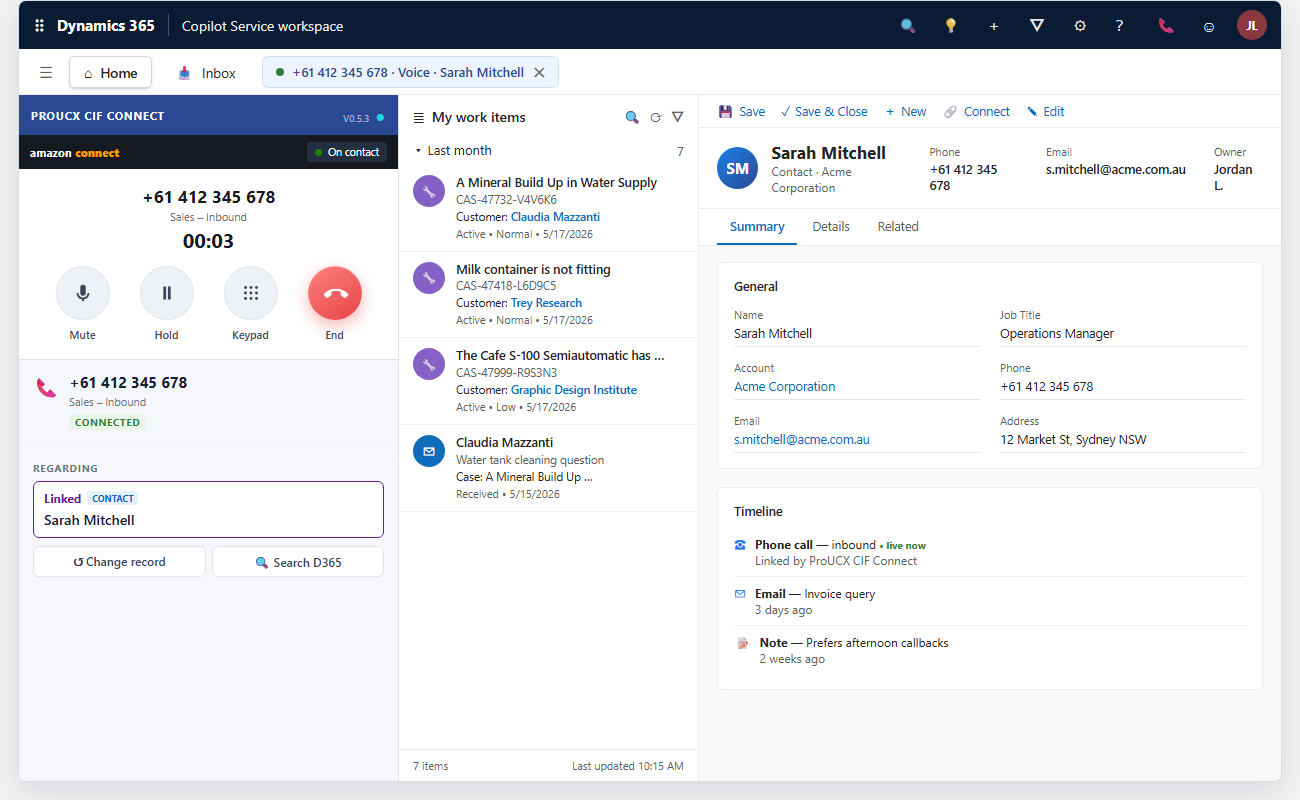


Connects your existing Amazon Connect instance to Microsoft Dynamics 365 — no Service Cloud, no extra dialer.

The right Contact or Account opens the instant the call connects. No searching, no copy-paste, lower average handle time.

Every call writes a phonecall activity automatically — even unmatched numbers — so your timeline and reporting are complete.

Call control lives in the Dynamics 365 multi-session panel agents already use. Less training, less window-juggling.
Try the connector yourself — no install
Click through the docked CIF v2 panel in a simulated Dynamics 365 Copilot Service workspace — accept a call, screen-pop a record, disposition and save, across match, no-match and multiple-match scenarios.
Stop switching between a softphone and your CRM
Agents waste seconds on every call hunting for the caller, copying notes between windows and forgetting to log activities. This Amazon Connect CRM integration closes the gap so the call and the customer record are one screen — a true Dynamics 365 CTI embedded in the agent workspace, not a browser plugin bolted on beside it.
From inbound call to logged activity
Amazon Connect routes the call. The connector reads the caller's number (ANI) and matches it against your Dynamics records in real time.
A single match opens the record; multiple matches show a picker; no match offers a pre-filled "create contact" form. Agents stay in control of what links to the call.
Click-to-dial outbound straight from D365 phone fields. The agent confirms the correct customer record to link to the call — even across multiple open sessions.

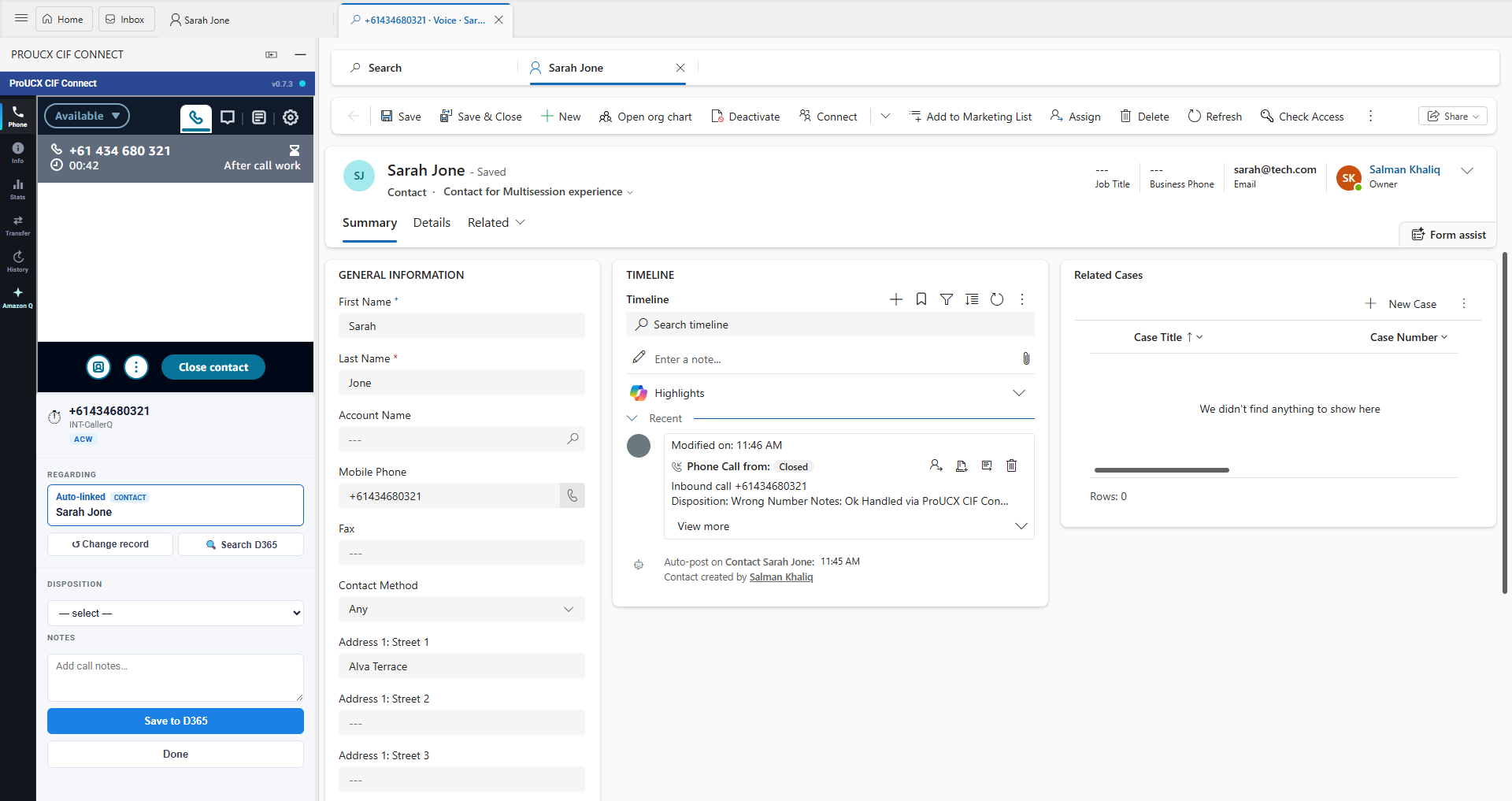
At after-call work the agent picks a disposition and adds notes. The connector finalises the phonecall activity with disposition, notes and the Connect contact ID.

Contact Trace Records and Contact Lens fill any disposition fields the agent didn't set — without ever overwriting the agent's own entries.
How the CIF v2 channel provider actually works
The connector is registered in your Dynamics 365 organisation as a Channel Integration Framework v2 channel provider. Dynamics loads the ProUCX panel into the docked channel widget, the agent signs in to your own Amazon Connect instance from inside it, and from that point call control and the customer record are one surface. Nothing is installed on the agent's desktop and there is no second softphone window to keep alive.
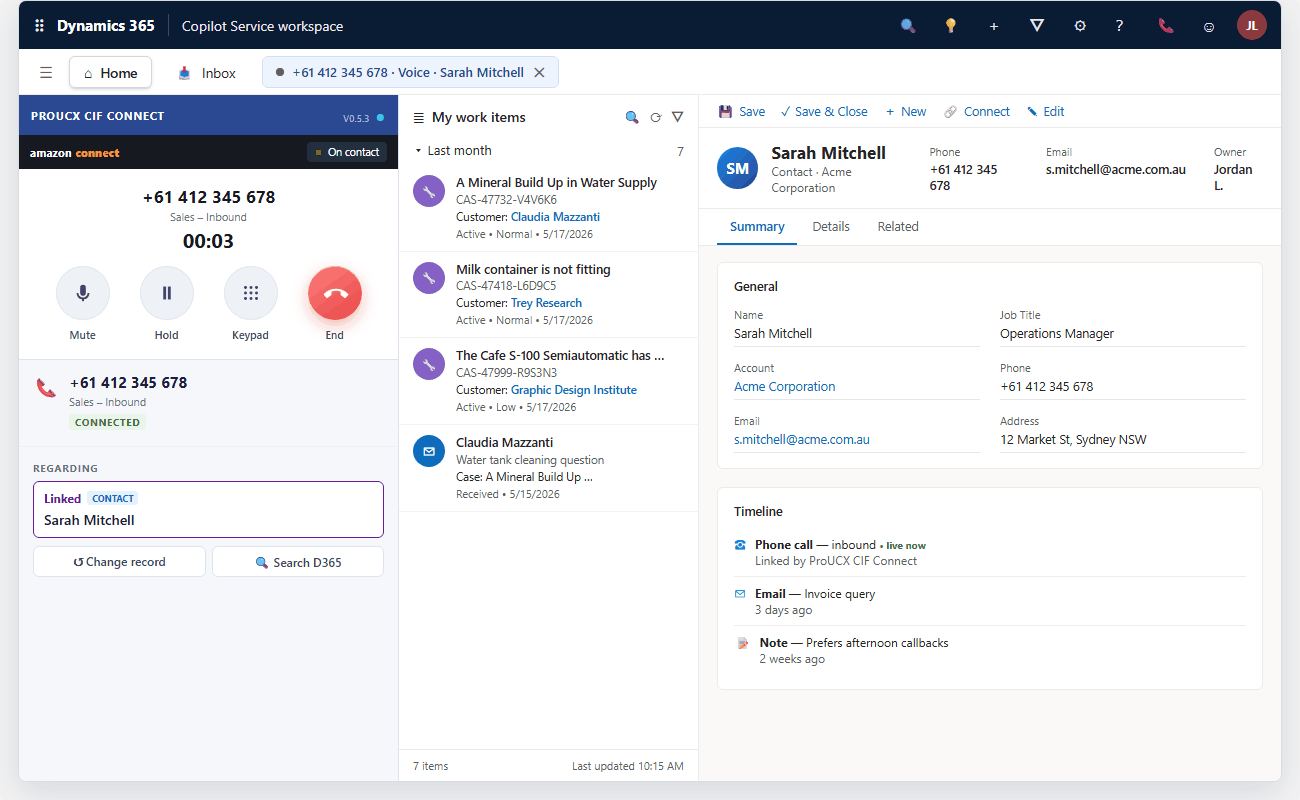
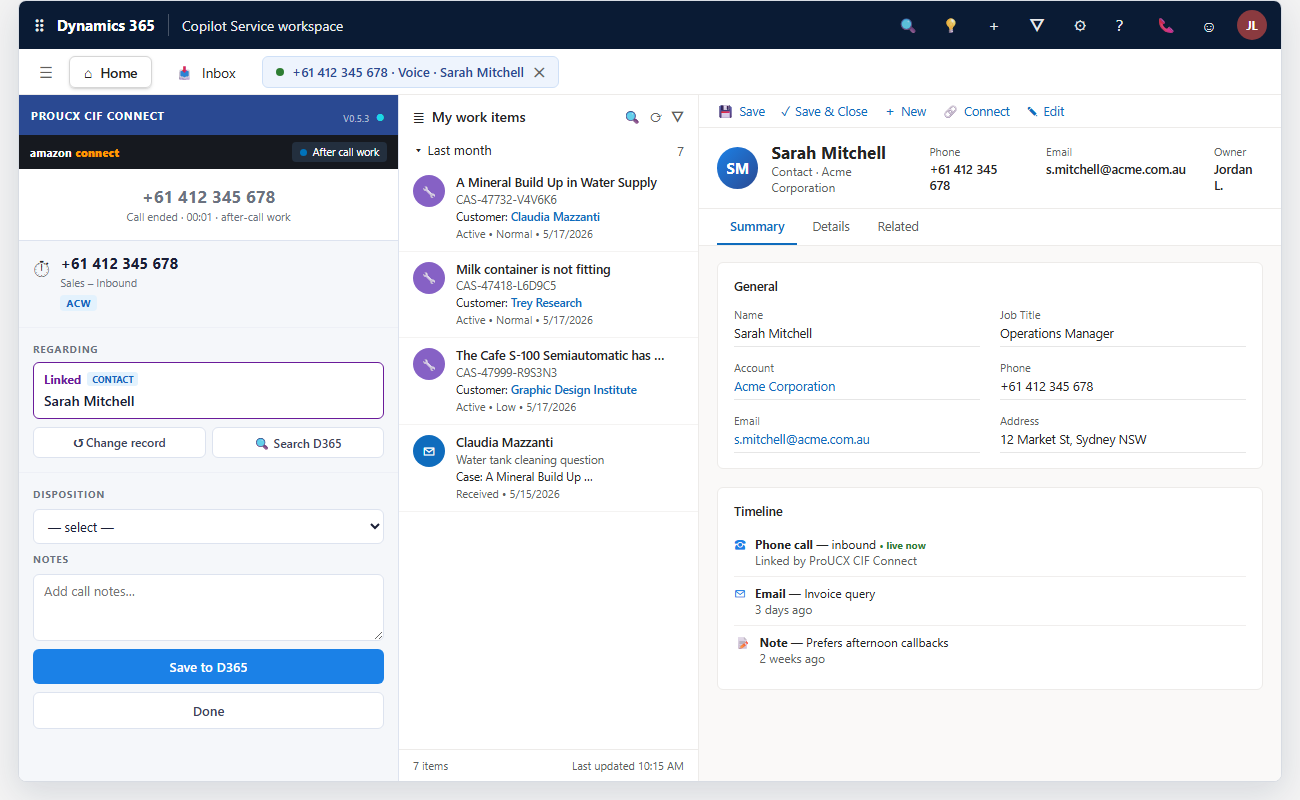
The panel is added to your organisation as a channel provider record and assigned to the app profiles and security roles you choose — the route Microsoft supports for embedding telephony, not a browser add-in.
The panel drives your Amazon Connect instance through the Amazon Connect Streams API, so answer, hold, mute, transfer, conference and after-call work all happen without leaving Dynamics 365.
CIF v2 is multi-session, and the connector uses it properly: each call opens its own session with its own tabs, so a second call never overwrites the record the agent linked to the first.
Dynamics collapses the channel widget on some navigation paths. The connector detects the collapse and re-docks itself, so call controls don't vanish the moment an agent opens a record mid-call.
Caller ID is matched with an OData query against the entities and phone fields you nominate — Contact and Account out of the box, others by configuration — with international +61-style numbers encoded correctly so matches don't silently fail.

The activity is created when the call is answered and finalised at wrap-up with disposition, notes, duration and the Amazon Connect contact ID — so Dynamics reporting and Amazon Connect reporting reconcile against the same call.
The caller is auto-linked to the matching record. Pick a disposition, add notes, save — and the phone call activity lands on the Dynamics timeline.
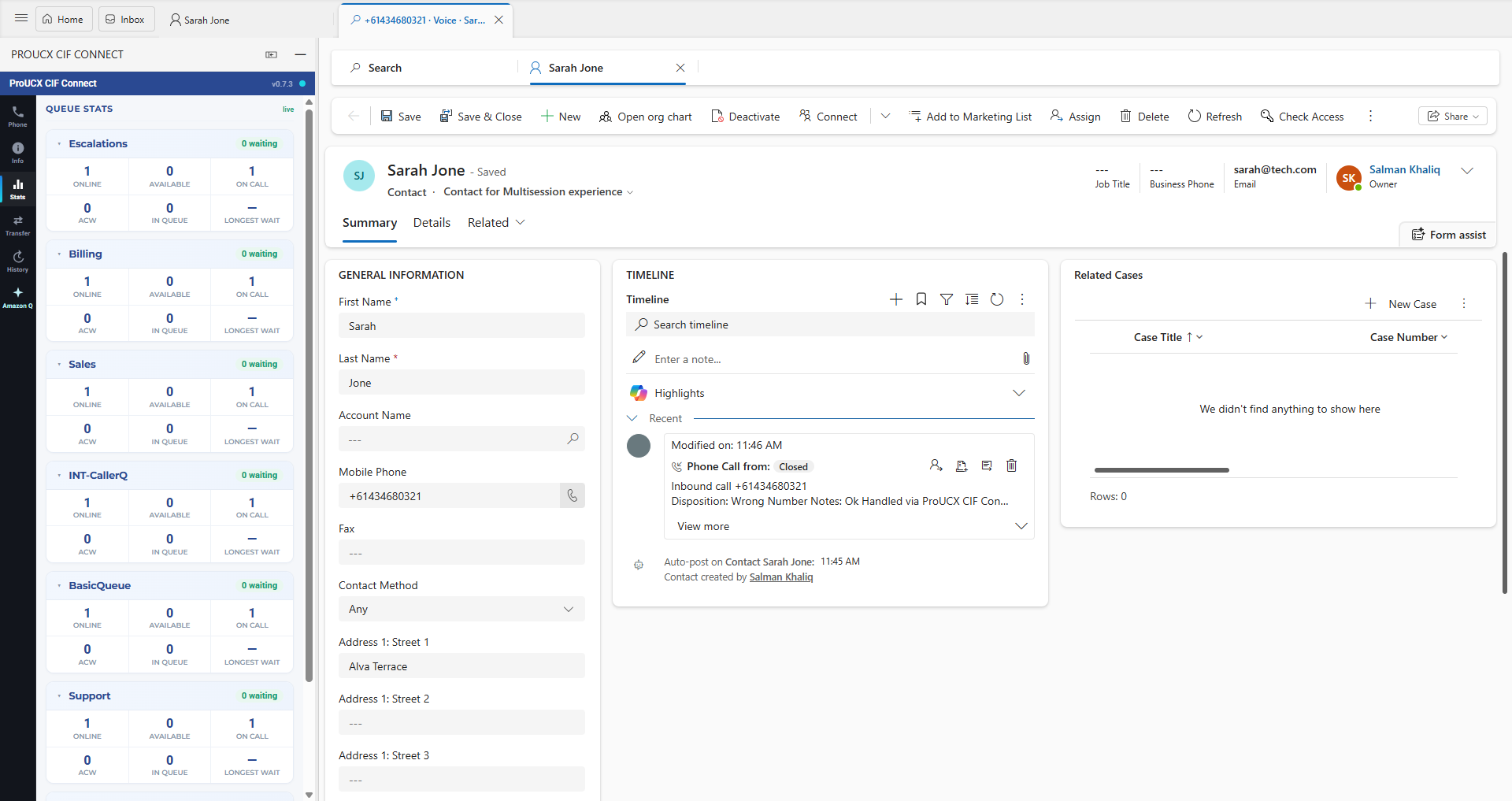
Online, available, on call, ACW, in queue and longest wait — per queue, refreshed live, without leaving the agent workspace.
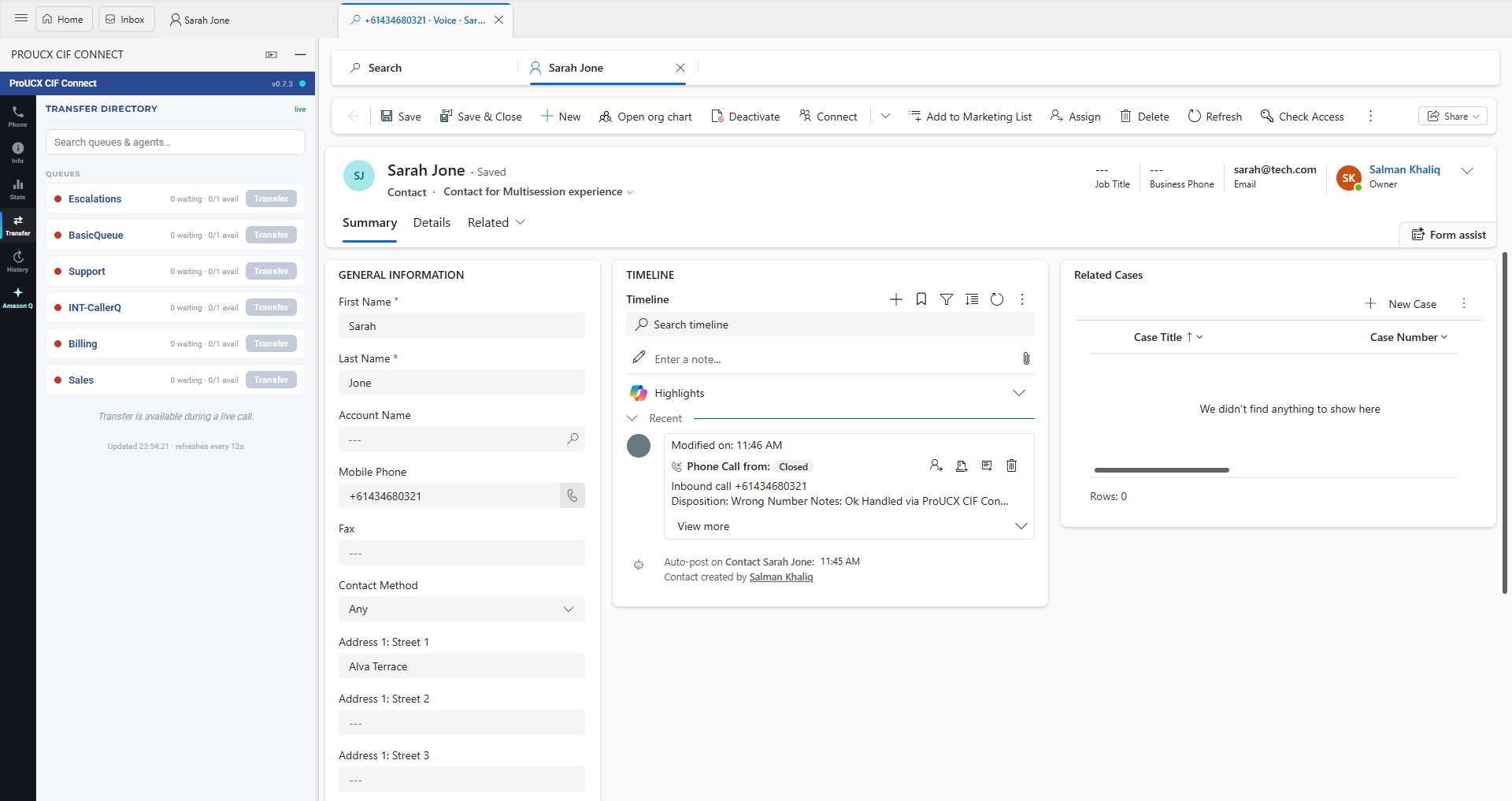
Search queues and agents and see who is free before you transfer — so calls go where they will actually be answered.
Everything a contact-centre team expects — natively in D365
Exact-match calls auto-open the Contact or Account and link it to the call's phonecall activity.
Several matches open a results view so the agent chooses the right person — browsing has no side effects.
Unknown numbers open a create form pre-filled with the caller ID, ready to save and link.
Dial out from any Dynamics phone field; the call launches through Amazon Connect.
Configurable wrap-up codes plus free-text notes written into the call timeline.
A phonecall activity is created on answer and finalised at wrap-up — optionally even for unmatched calls.

With several calls open, the correct record links to the correct session — state is isolated per call.

Server-side reconciliation guarantees a complete record even if an agent skips wrap-up.

Search entities, match fields, dispositions, screen-pop timing and more — tuned per customer, no code.
Which Dynamics 365 app your agents sit in decides this
Before telephony comes into it at all, there is a Microsoft-side question that settles the shape of the project: which Dynamics 365 app your agents actually work in. Channel Integration Framework comes in two versions, they serve different apps, and a connector built for one does not appear in the other. This connector is a CIF 2.0 channel provider. Microsoft sets the split out in its own version comparison.
The multisession apps: Omnichannel for Customer Service and Copilot Service workspace. Supports multiple telephony channel providers at once, puts the communication panel on the left, and adds channel analytics and session, notification and application-tab templates.
Dynamics 365 Customer Service, Sales, Project Service and Field Service. One channel provider at a time, panel on the right. Microsoft also lists 1.0 as the version available for Government Community Cloud.
If your agents already work in Omnichannel for Customer Service or the Copilot Service workspace, this drops in. If they are in single-session Customer Service or Sales today, moving them is a Dynamics licensing and change-management exercise that belongs in the plan before telephony does. We will tell you which side you are on in the first call.
The Dynamics-side setup, step by step
Every step is configuration — no code to write, nothing to install on agent machines. This is exactly what a rollout touches on the Microsoft and Amazon Connect side, and what we work through with you during onboarding.
Create the channel provider record in Dynamics 365 with the ProUCX panel URL, a unique name and the channel order, then save and publish it to the organisation.
Attach the provider to the app profiles that should see it — typically the Customer Service or Copilot Service workspace — and to the security roles your contact-centre agents hold.
CIF v2 will not open a session per call without a valid generic session template and application tab. We supply the template values and verify them against your organisation before testing.
Your Amazon Connect instance has to list both the panel origin and your Dynamics organisation as approved origins before an embedded softphone will load. It is the most common cause of a blank panel, so we check it first.
Nominate the entities and phone fields to match on, the behaviour for a single match, several matches and no match, and the wrap-up codes agents choose from. Per tenant, no code.
A real call through your own Amazon Connect instance, watched end to end — pop, link, log, disposition — before an agent goes anywhere near it. See support & onboarding.
Where your call data actually lives
The short version: the call record lives in your Dynamics 365 organisation, the audio stays in your Amazon Connect instance, and ProUCX holds configuration.
Phonecall activities, dispositions and notes are written into your own Dynamics 365 organisation, under your retention, audit and access rules — not into a ProUCX database.
Call audio and recordings remain in your own Amazon Connect instance and its storage. The connector links the call to the record; it does not take custody of the recording.
Multi-tenant with isolated per-tenant configuration, hosted on AWS with data residency in Australia, Singapore, the USA and Europe, so Australian contact centres can keep the connector onshore. More in security.
The contact-centre/CRM stack is re-platforming
Microsoft has made Channel Integration Framework v2 the standard for embedding voice in Dynamics 365, and Salesforce's Open CTI reaches end-of-life in February 2028 — forcing a wave of connector rebuilds across the industry. Modernising your Amazon Connect ↔ Dynamics integration now, on the current framework, puts you ahead of that curve instead of behind it. Weighing it against Microsoft’s own contact centre? We compare Microsoft’s own Dynamics 365 Contact Center voice channel with Amazon Connect.
Simple per-tenant pricing, plus per-agent
A flat platform fee per Dynamics organisation, plus a per-agent monthly rate. No telephony lock-in, no transaction fees. Indicative pricing — confirmed during scoping. Prefer it on the AWS bill you already reconcile? The connector is also metered through AWS Marketplace at US$9 per agent per month, or US$15 on the premium tier.
Screen-pop & click-to-dial. Automatic call logging. Up to 20 agents. Email support.
Most popular. Minimum 10 agents. Everything in Starter, plus dispositions, notes & wrap-up, CTR / Contact Lens backstop, and priority support & onboarding.
Volume & annual. Everything in Team, plus SSO & multi-org, custom entities & dispositions, SLA & dedicated support.
Which Dynamics 365 and Amazon project are you actually doing?
“Dynamics 365 Amazon integration” is four or five unrelated projects wearing the same name. They involve different Microsoft products, different Amazon services and usually different departments, and the only thing they share is the search phrase. This page is about one of them. The others are listed here so you can rule them in or out before anyone writes a business case.
The contact-centre one, and the subject of this page. A softphone embedded in the agent workspace through Microsoft’s Channel Integration Framework: the call arrives on the record, it is logged automatically, and the telephony stays in your own Amazon Connect instance. This is what ProUCX builds.
Order, inventory and fulfilment sync for businesses selling on the Amazon marketplace. A large and crowded category of connectors, and nothing to do with telephony. ProUCX does not build it, and a CTI connector will not help you with it.
The enterprise version of the same job, usually searched as “Dynamics FO Amazon integration”. Finance & Operations is a different application family from the Customer Engagement apps this connector works with, so this is a different project with different vendors.
Moving Dynamics records into AWS so they can be queried alongside everything else, or bringing external data back in. AWS publishes its own Microsoft Dynamics 365 connectors for both services. This is normally a data-team project rather than a contact-centre one.
Hosting and infrastructure rather than integration at all — where the application runs, not what it talks to. It turns up in the same searches and is worth separating out early, because it is an entirely different conversation with entirely different people.
Ask who is complaining. Agents alt-tabbing between a softphone and a customer record means the Amazon Connect CTI. A warehouse, orders or stock levels means Seller Central. An analyst who cannot get Dynamics data into a dashboard means AppFlow or Glue. A finance team worried about hosting cost means neither.
If it is the contact centre you are solving, the rest of this page is about exactly that — or start with how the connector works. For the same question asked about a different CRM, see Amazon Connect for HubSpot and for Pipedrive.
Common questions
Yes. It runs as a multi-session CIF v2 channel provider inside the Customer Service workspace, with docked panels and session-per-call.
No. It connects your existing Amazon Connect instance directly to Dynamics 365 — no extra telephony platform to license.
Call activities and dispositions are written into your Dynamics 365 organisation. ProUCX stores only per-tenant configuration, hosted on AWS with data-residency options in Australia, Singapore, the USA and Europe.
We connect your Connect instance and D365 org, configure screen-pop and dispositions, and verify a live test call. Most tenants are live within days. See support & onboarding.
Microsoft's supported way to embed a telephony panel in Dynamics 365. Version 2 is the multi-session one: the provider gets a docked widget in the agent workspace and can open a Dynamics session per contact. The connector is a CIF v2 channel provider, so it uses the framework Microsoft maintains rather than a browser add-in.
A channel provider record pointing at the panel, the app profiles and security roles that should see it, and a generic session template with an application tab so each call opens its own session. All configuration — no code, and nothing installed on agent machines. The steps are in the setup path above.
Contact and Account out of the box. Any entity with a phone field can be added: you nominate the entities and match fields per tenant, and set the behaviour for a single match, several matches and no match at all.
Each call gets its own CIF session with its own state, so the record linked to the first call is not overwritten by the second. Browsing a multi-match list has no side effects until the agent confirms the record.
No. Call control lives in the docked Dynamics panel — answer, hold, mute, transfer, conference and after-call work — so there is no second window to keep open beside the agent workspace.
It is listed on AWS Marketplace as Amazon Connect CTI for Dynamics 365 and metered per active agent — US$9 per agent per month, or US$15 on the premium tier — billed to the AWS account you already have. Direct per-organisation plans are on the pricing page.
Yes. Routing stays in Amazon Connect — the connector doesn't touch your contact flows, queues or routing profiles. It reads the contact Connect has already routed and writes the activity into Dynamics.
Server-side reconciliation from the Contact Trace Record and Contact Lens fills the disposition fields the agent didn't set, without overwriting anything the agent did enter — so the Dynamics record stays complete either way.
No. We build the contact-centre integration — Amazon Connect telephony inside the Dynamics 365 agent workspace. Marketplace order, inventory and fulfilment sync is a separate category of product from different vendors, and we would rather say so than take the meeting.
The model-driven Customer Engagement apps, principally Dynamics 365 Customer Service and Dynamics 365 Sales, through Microsoft’s Channel Integration Framework. If your agents work in one of those, the softphone appears in their workspace.
Those are a different application family from the Customer Engagement apps the Channel Integration Framework serves, so they are not where this connector lives. If you are looking at telephony for an F&O or Business Central team, talk to us about what the actual requirement is before assuming either way.
AppFlow and AWS Glue both publish Microsoft Dynamics 365 connectors, and they are the right tools for moving records in bulk for analytics. They are not a substitute for a CTI: they move data on a schedule, they do not put a ringing phone on an agent’s screen.
The multisession apps — Omnichannel for Customer Service and the Copilot Service workspace — because it is a Channel Integration Framework 2.0 channel provider, and Microsoft scopes CIF 2.0 to those apps. If your agents work there today, this is a configuration exercise.
Those are single-session apps, which Microsoft serves with Channel Integration Framework 1.0 — a different version that supports one channel provider at a time and docks the panel on the right. This connector is a CIF 2.0 provider, so moving agents into a multisession app is a Dynamics-side change to scope first. Tell us which app they are in and we will say plainly which side of that line you are on.
In CIF 2.0, yes — Microsoft lists support for multiple telephony channel providers as one of the differences from version 1.0, which allows one at a time. That matters during a migration, when a new contact centre and the outgoing one have to coexist in the same agent workspace for a period.
See it on your own Amazon Connect & Dynamics
Book a 30-minute demo and we'll show a live call screen-popping and logging inside Dynamics 365 — or subscribe on AWS Marketplace and bill it to the AWS account you already have.