
Bring every Amazon Connect call into Pipedrive.
Screen-pop, click-to-dial and automatic call logging, from US$9 per agent per month on AWS Marketplace. It runs on the Amazon Connect instance you already own: every inbound call opens the matching person or deal, and every call is written back as a Pipedrive activity with outcome, duration and notes, so your sales team never loses a conversation.
 Available on AWS MarketplaceAmazon Connect Softphone for Pipedrive · consolidated AWS billing
 Available on Pipedrive MarketplaceLiveUCX Softphone for Amazon Connect · install in Pipedrive
Amazon Connect × Pipedrive · Screen-pop · Click-to-dial · Automatic activity logging · Multi-tenant
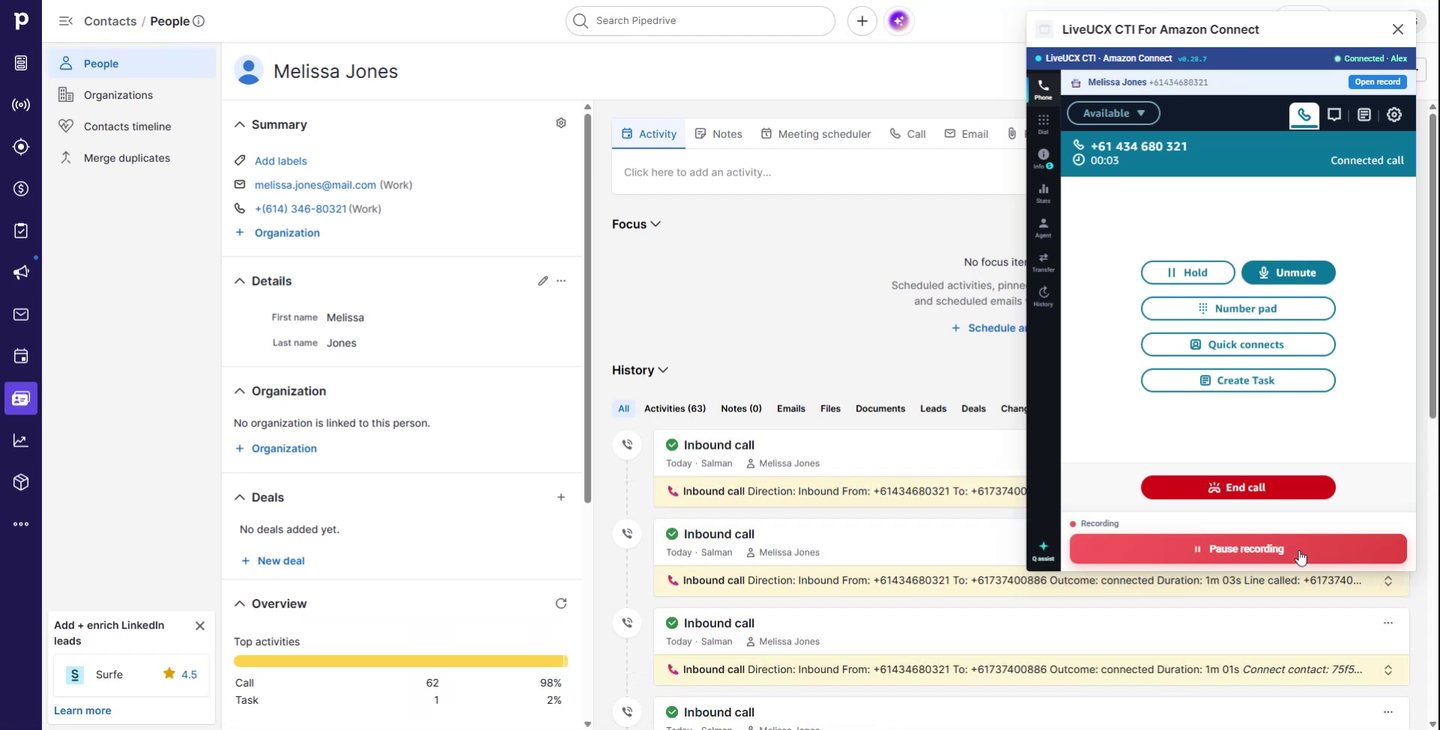
Connects your existing Amazon Connect instance to Pipedrive — no extra dialer.

The matching person or deal opens the moment the call connects — no searching, more selling time.

Calls are written to Pipedrive as activities automatically, with outcome, duration and notes.

Calls attach to the right person and deal, so your pipeline reflects real activity.
Watch the 90-second demo
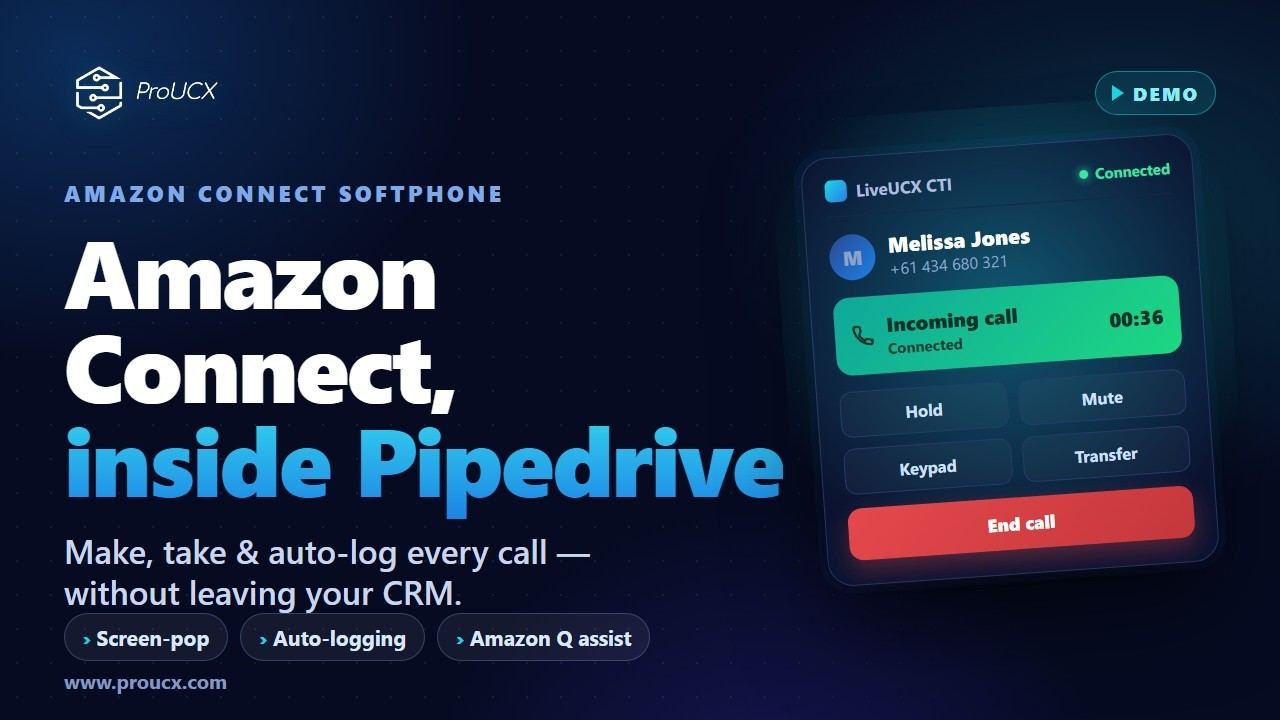
Make and take Amazon Connect calls, screen-pop the caller and log everything automatically — without leaving Pipedrive.
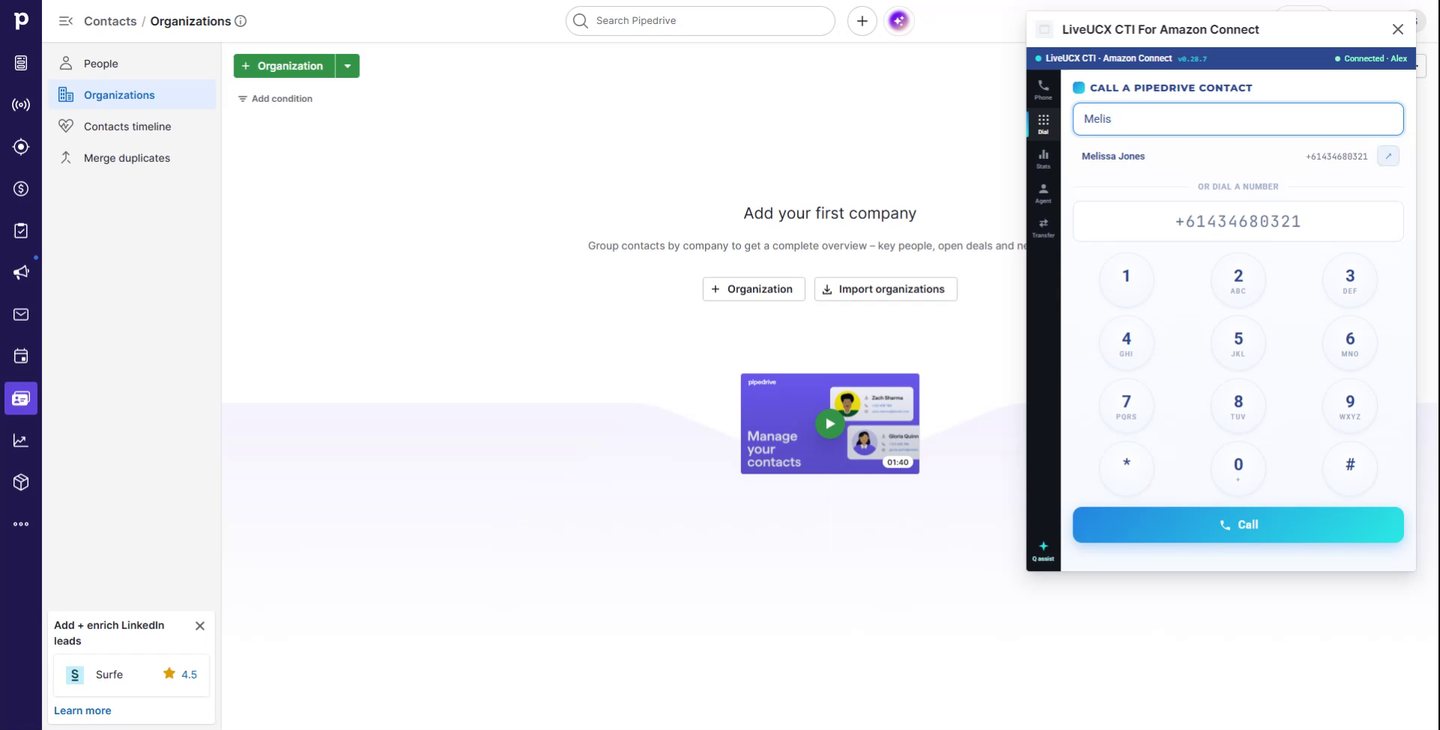
Call any number in one click, or type a name to dial a Pipedrive contact — all from the panel.
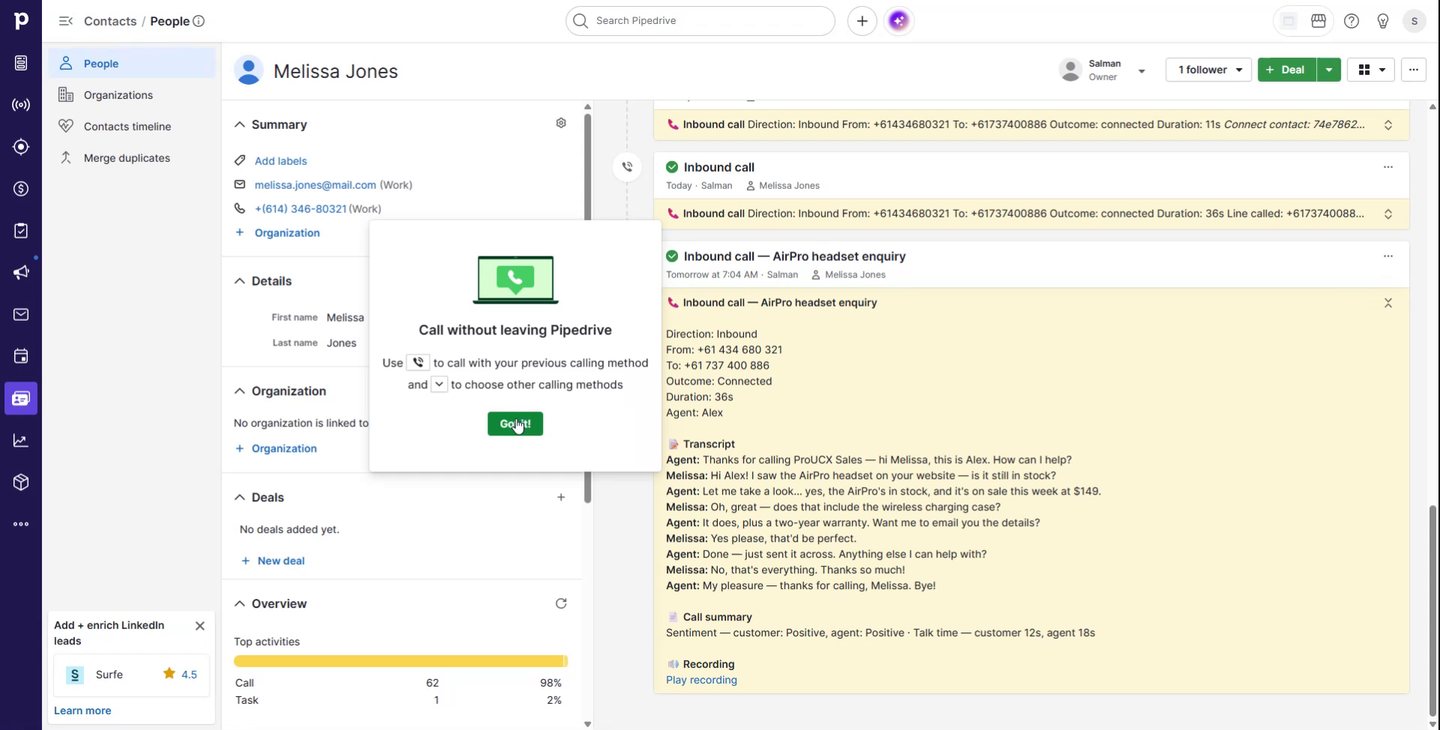
When a call ends, the activity is written automatically — with disposition, a recording link, the transcript and an AI summary.
See contacts waiting, agents available and the longest wait — in real time, right in the panel.
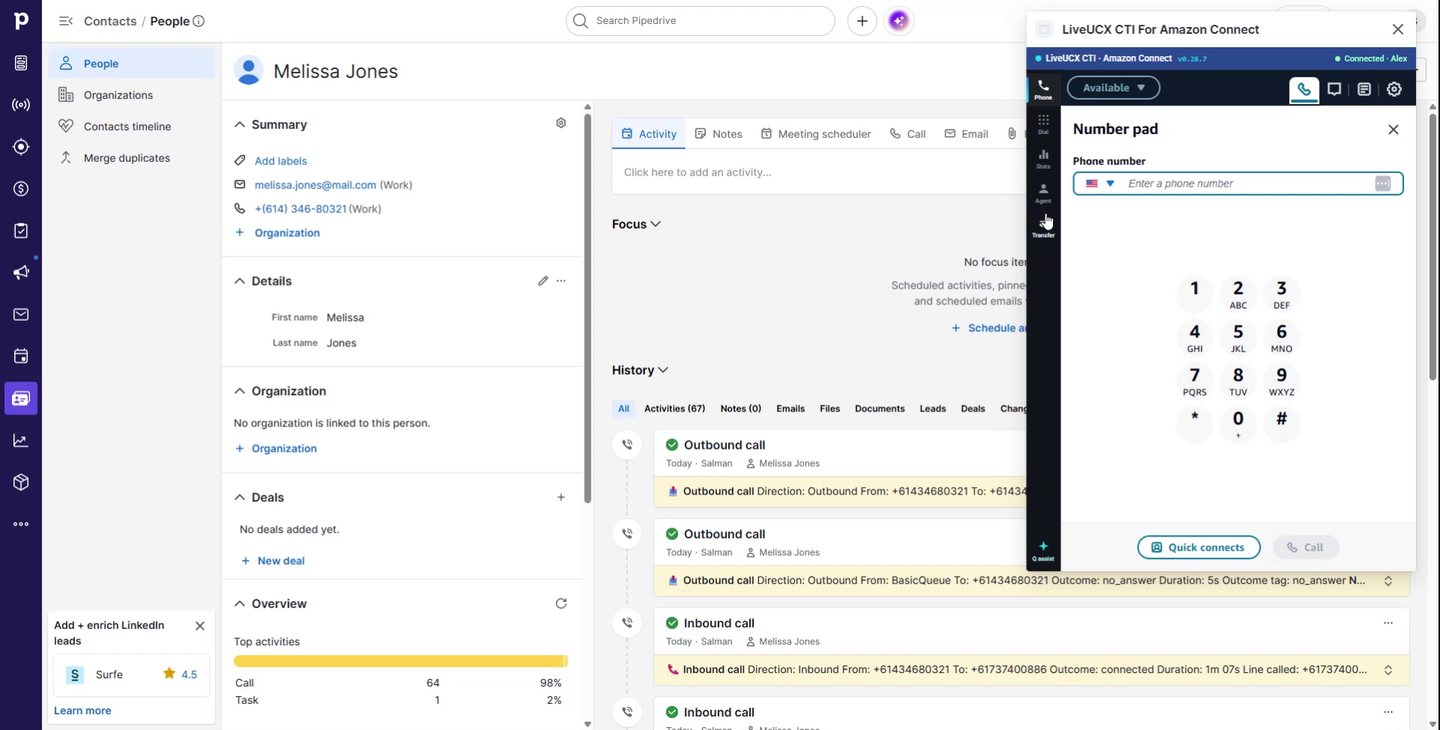
From inbound call to logged Pipedrive activity
Sales reps shouldn't switch between a phone app and Pipedrive or log calls by hand. ProUCX makes the call and the Pipedrive record one screen. For the full walk-through — what Pipedrive does natively, how screen-pop matches a caller to a person and deal, and how to get it live — read our comparison of Pipedrive calling and an Amazon Connect CTI.
Authorise Pipedrive once; the connector links it to your Amazon Connect telephony.
On an inbound call the caller number is matched to Pipedrive and the person or deal opens automatically.
Click any phone number in Pipedrive to dial out through Amazon Connect.

The call is logged as a Pipedrive activity with outcome, duration and notes, linked to the person and deal.

Attach the recording and call outcome so managers get a complete picture in the pipeline.

Screen-pop person & deal on inbound, click-to-dial from any Pipedrive number, auto-logged activities with outcomes, recordings linked to the activity, and per-tenant configuration hosted on AWS with data residency in AU, SG, USA & EU.
“Pipedrive and Amazon Connect cannot be integrated”
You may well have read that, because it is near the top of the search results for this exact question. The source is a thread on Pipedrive’s own developer community: someone asks “has anyone integrated pipedrive with amazon connect?” and the single reply says “unfortunately, not yet”. It is a fair answer and it was correct when it was written. It was written in August 2019, it has one reply, and the thread has had no activity since December 2021. Nobody has gone back to update it, which is how a seven-year-old “no” ends up outranking the products that answer it.
Amazon Connect Streams gives a browser application the call events and call control that a CTI needs, and Pipedrive’s app extensions let a panel live inside the CRM rather than beside it. Both of those are what this connector is built on. In 2019 the honest answer really was “not yet”.
It is listed on AWS Marketplace, which means AWS has reviewed it and you can buy it on your existing AWS account. There is also a ninety-second demo further up this page showing a real call screen-popping a real Pipedrive person, because a claim like this should be shown rather than asserted.
Including this page, which we date and revise. Contact-centre and CRM platforms both ship quarterly, so a forum reply, a comparison article or a vendor FAQ from more than a year or two ago is evidence about the past. Worth remembering for the next “you cannot do that” you find.
The other thing that search throws up is the automation platforms — n8n, Make, Zapier — and it is a reasonable question whether one of those would do instead. For moving records, often yes. For a phone call, the limitation is not the platform’s quality but what it is given to work with: the n8n page that ranks for this term names no specific AWS service, reaches Amazon through a generic HTTP request, does not mention Amazon Connect, and offers no call trigger, no answer, hold or transfer action, and nothing that puts a record on an agent’s screen. Its Pipedrive side is deals, people, organisations, notes and activities. That is workflow automation, and it runs after something has happened. A CTI has to act during the two seconds while the phone is ringing, which is a different problem.
Everything sales & support expect — natively in Pipedrive
A shared connector core with a thin adapter per CRM, running on the Amazon Connect instance you already own.
Full call control — answer, hold, mute, transfer — docked in Pipedrive, staying connected as reps move between records.
Caller ID is matched to Pipedrive and the person or deal opens automatically the moment the call connects.
Dial any Pipedrive number in one click through Amazon Connect, or find a contact by name.
Inbound & outbound calls logged as Pipedrive activities with direction, duration, outcome and disposition.
The recording link, Contact Lens transcript and an AI summary of the conversation land on the activity.
A real-time queue board in the panel — contacts waiting, agents available and longest wait.

Instant answers from your knowledge base while you're on the call, without leaving Pipedrive.

Your Amazon Connect stays in your own AWS account; we read it through a scoped, read-only role. No AWS keys to hand over.

Isolated per-tenant configuration, least-privilege access, and data residency in AU, SG, USA & EU.
Which Amazon service do you actually need with Pipedrive?
Searching for Pipedrive and AWS together turns up several unrelated projects, and AWS itself publishes two Pipedrive connectors that have nothing to do with phone calls. They are easy to confuse on a search results page and expensive to confuse in a plan, so here is the whole set, named plainly. This page is about the first one.
Your reps call and are called from inside Pipedrive, and the activity writes itself. A computer-telephony integration: the softphone sits in Pipedrive, the telephony stays in your own Amazon Connect instance, and no call audio passes through us. This is the one ProUCX builds, and the rest of this page is about it.
AWS publishes its own Pipedrive connector for Amazon AppFlow, to “transfer data about your deals, contacts, proposals, and more to AWS services”. It is a managed data pipeline on a schedule or a trigger. It moves records, not conversations, and it will not put a phone in Pipedrive.
AWS also documents connecting AWS Glue to Pipedrive so you can “use Pipedrive as a data source in your ETL Jobs”. This is the engineering-grade version of the route above: more control, more code, same destination. A data team owns it, not a contact centre team.
Where the two routes above land, and what you point at the result: a bucket or a warehouse to hold Pipedrive data next to everything else, and QuickSight to chart it. If what you actually want is a dashboard your sales director will open on a Monday, this is your project and a telephony connector is no help at all.
Pipedrive has publicly described completing its full migration to Amazon Web Services. That is Pipedrive’s own hosting, not something you buy, configure or integrate. It is named here only because it ranks alongside everything else and reads like an integration when it is not.
The quickest way to tell them apart is to ask who is complaining. If it is reps — dialling from a handset, retyping notes, answering a call with no idea who it is — you want the Amazon Connect CTI, and that is this page. If it is an analyst who cannot get deal data into a dashboard, you want AppFlow or Glue and somewhere to put the output. Both are legitimate projects; they are simply not the same one, and they are not bought from the same place.
Common questions
Yes — inbound and outbound Amazon Connect calls become Pipedrive activities with outcome, duration and notes, linked to the person and deal.
No. It links your existing Amazon Connect telephony directly to Pipedrive.
Yes — the caller number is matched to Pipedrive and the person or deal opens on connect.
On AWS, multi-tenant, with data residency in Australia, Singapore, the USA and Europe.
US$9 per agent per month for the standard tier and US$15 for premium. You can subscribe on AWS Marketplace so it bills against the AWS account you already have, or directly through ProUCX. Amazon Connect telephony is billed by AWS separately, exactly as it is today.
A Pipedrive account and an Amazon Connect instance with the agents and queues you already use. The only change on the AWS side is adding the Pipedrive origins to the approved origins list on your Connect instance, which is a settings change and is reversible.
No. There is no CloudFormation stack, no Lambda to maintain and nothing to install on the rep’s machine. The connector runs as a hosted service that talks to your instance through Amazon Connect’s own APIs.
Yes, and that is the sensible way to evaluate it. We set up a tenant against an instance you nominate so your reps test it against your real routing and your real Pipedrive data rather than a demonstration script.
In your own AWS account, under your own retention settings, exactly where Amazon Connect already puts them. The Pipedrive activity links to the recording rather than copying the audio into Pipedrive or into our platform.
Per named agent who uses the connector, not per concurrent session, so the number you are billed for is the number of people you have set up. If your team size changes, tell us and the count changes with it.
It can, and for most teams that is the point. Pipedrive’s own calling is a dialler attached to the CRM. This brings your Amazon Connect instance into Pipedrive instead, so routing, queues, recording and Contact Lens stay where your contact centre already runs them.
A real call handled end to end inside Pipedrive: the inbound call arriving, the matching record opening, the call controls in the docked panel, and the activity written to the Pipedrive timeline afterwards. It runs about ninety seconds and it is the quickest way to tell whether this is what you pictured.
Two, and neither one carries calls. AWS publishes a Pipedrive connector for Amazon AppFlow for transferring deal, contact and proposal data into AWS services, and it documents connecting AWS Glue to Pipedrive to use it as a data source in ETL jobs. Both move records on a schedule. Putting a working softphone on a Pipedrive record is a different job, and that is what this connector does.
No, and we would rather say so here than after a procurement cycle. Getting deals and activities into a warehouse or onto a dashboard is an AppFlow or Glue job owned by a data team. This connector is telephony: it puts the phone in Pipedrive and writes the call back to the record. The two sit in different budgets and solve different complaints.
No. Pipedrive has publicly described completing its own migration to Amazon Web Services, but that is where Pipedrive hosts its platform — it is not a feature you can switch on, and it creates no connection between your Pipedrive account and your Amazon Connect instance. That connection is what this connector provides.
It was, and the thread saying so is still near the top of the results. It is on Pipedrive’s own developer community: the question is “has anyone integrated pipedrive with amazon connect?” and the one reply is “unfortunately, not yet”. That was posted in August 2019 and the thread has had no activity since December 2021. This connector exists, is listed on AWS Marketplace, and there is a demo of it on this page.
For moving records between Amazon services and Pipedrive, quite possibly. For a phone call, no — and it is about event timing rather than the platform. The n8n page that ranks for this term names no specific AWS service, reaches Amazon through a generic HTTP request, does not mention Amazon Connect, and lists no call trigger and no answer, hold or transfer action. Workflow automation runs after something has happened; a CTI has to screen-pop while the phone is still ringing.
See it on your own Amazon Connect & Pipedrive
Start a 14-day free trial on your own Amazon Connect instance and Pipedrive account, install it from the Pipedrive Marketplace, or book a demo and we’ll show a live call screen-popping and logging inside Pipedrive. Prefer consolidated billing? Subscribe on AWS Marketplace.