
Bring every Amazon Connect call into HubSpot.
An embedded softphone on your HubSpot records, from US$9 per agent per month on AWS Marketplace. It runs on the Amazon Connect instance you already own and bills to the AWS account you already have: the matching contact opens as the call connects, and every call lands on the HubSpot timeline with recordings attached.
 Available on AWS MarketplaceAmazon Connect Softphone for HubSpot · consolidated AWS billing
Built on the HubSpot Calling Extensions SDK & Amazon Connect Streams · Multi-tenant · Hosted on AWS with data residency in Australia, Singapore, the USA & Europe


Connects your existing Amazon Connect instance to HubSpot — no Service Hub add-on, no extra dialer.

The matching contact or company opens the moment the call connects — no searching, lower handle time.

Inbound and outbound calls are written to the HubSpot timeline automatically, with outcome, duration and notes.

An embedded softphone on the record, native to HubSpot — nothing new for reps to learn.
Your reps already live in HubSpot. Put the phone there too.
Sales and support reps shouldn't juggle a separate softphone and copy notes by hand. ProUCX makes the call and the HubSpot record one screen. Weighing this against the dialler HubSpot already includes? We set the two side by side in Amazon Connect + HubSpot vs HubSpot's native calling.
From inbound call to logged engagement
Connect your HubSpot portal with a secure OAuth install — the ProUCX softphone appears on contact and company records.
Point the integration at your existing Amazon Connect instance. Agents sign in and take calls in the embedded softphone.
On an inbound call, the caller's number is matched to HubSpot and the right contact or company opens automatically.

Click any phone number in HubSpot to dial out through Amazon Connect, straight from the record.

The call is logged as an engagement on the timeline with outcome and notes, and the recording is linked when available.
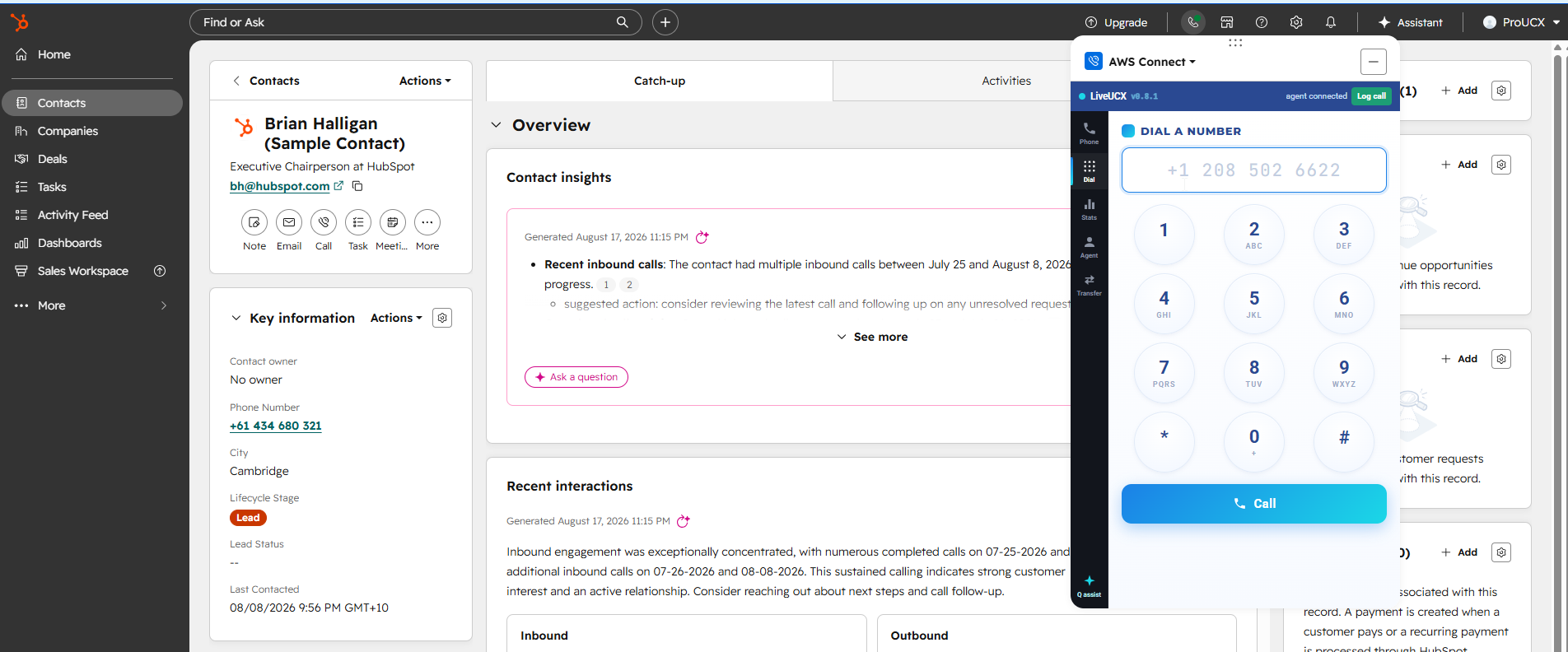
The softphone docks alongside the HubSpot contact. Dial a number, or click any number on the record to place the call through Amazon Connect.
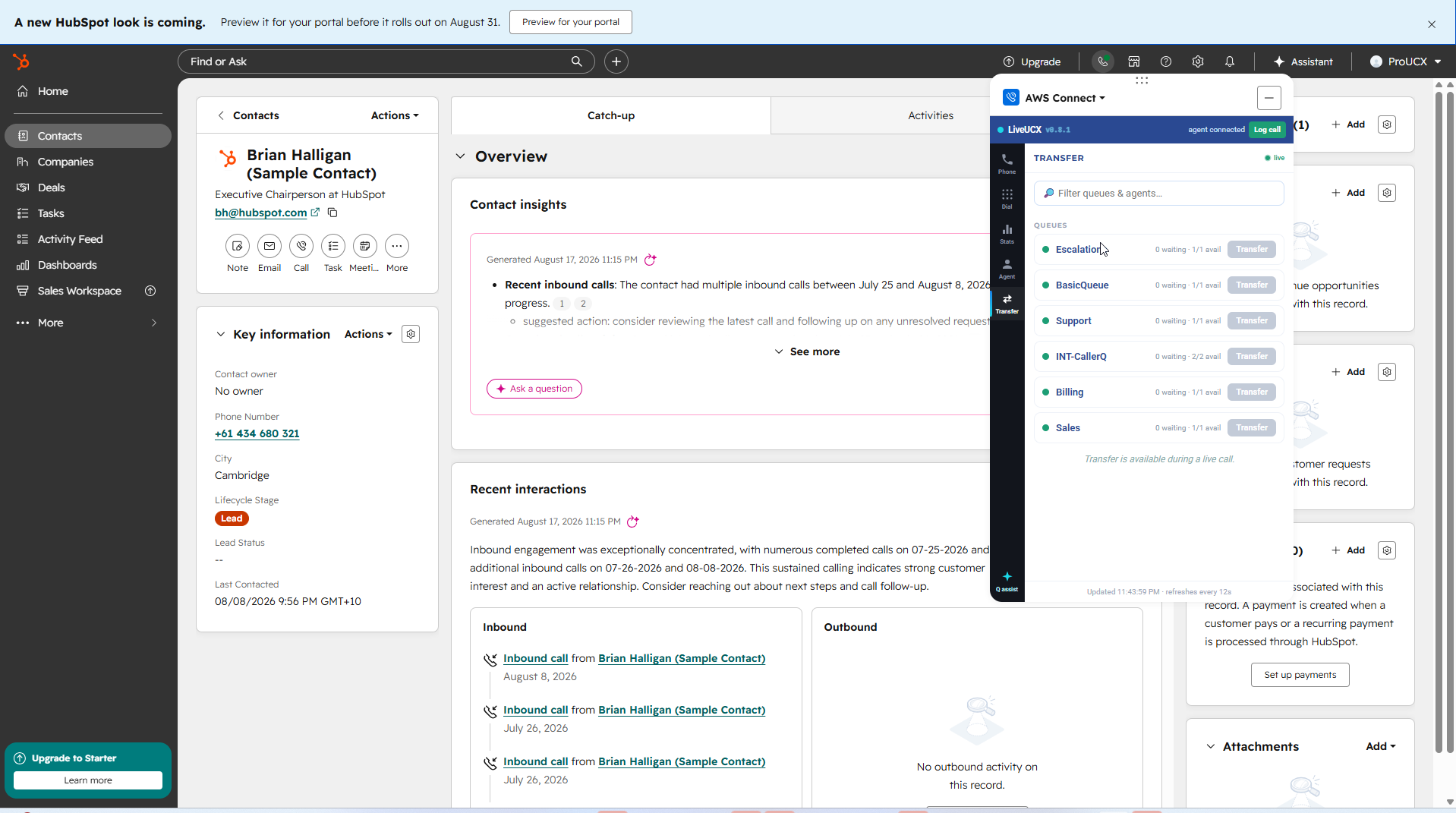
Search queues and agents, and see who is waiting and who is available before you transfer — refreshed live in the panel.
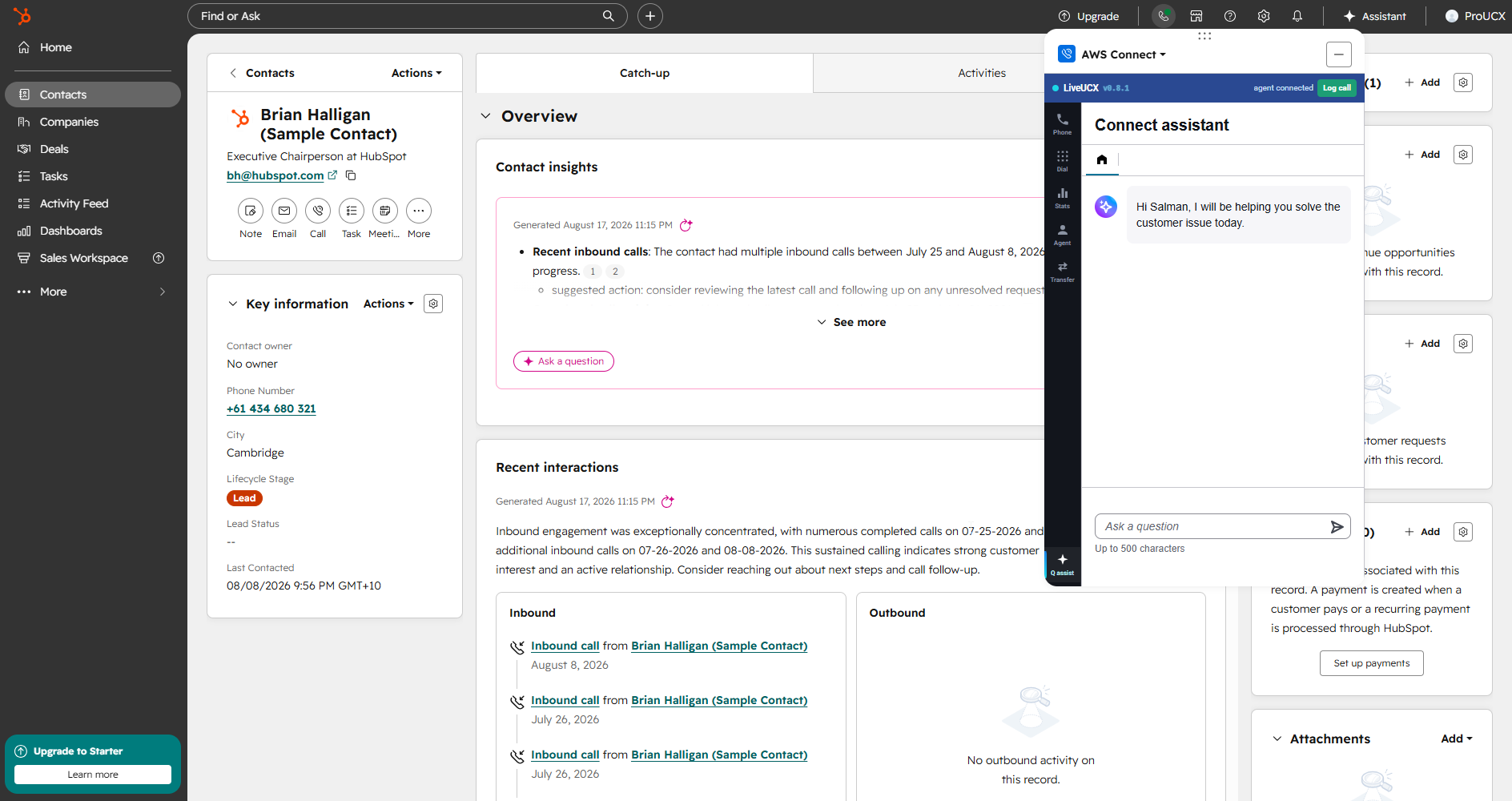
Ask a question and get an answer from your knowledge base while the call is live, without leaving HubSpot.
Everything reps expect — natively in HubSpot
A calling widget on contact and company records, built on HubSpot's Calling Extensions SDK.
Inbound caller ID is matched to HubSpot and the record opens automatically.
Dial any HubSpot phone number through Amazon Connect in one click.
Inbound & outbound calls logged as timeline engagements with outcome, duration and notes.
Recordings linked to the call engagement and accessible from the record.

Full call lifecycle — answer, hold, transfer and wrap-up — reflected in HubSpot.

Isolated per-tenant configuration, OAuth tokens encrypted at rest, least-privilege access.

Hosted on AWS with data residency in Australia, Singapore, the USA and Europe.

Uses your existing Amazon Connect instance — no additional dialer to license.
Which Amazon service do you actually need with HubSpot?
“Amazon HubSpot integration” covers at least four unrelated projects. They share a brand name and nothing else — different teams own them, different tools build them, and the wrong one costs you a quarter. This page is about the first of them. The others are named here so you can rule them in or out quickly.
If the problem is that reps make and take calls somewhere other than HubSpot, and the call notes get retyped afterwards, this is the one you want. It is a computer-telephony integration: the softphone is embedded in HubSpot and the telephony stays in your own Amazon Connect instance. That is what ProUCX builds.
Exporting HubSpot contacts, deals and events into a bucket so they can be queried next to everything else you hold. HubSpot offers a native S3 export and several third-party tools cover the rest. It has nothing to do with calls, and a CTI connector will not help you with it.
Once HubSpot data is sitting in S3, these are what you point at it to build dashboards. This is a business intelligence project and it is normally owned by a data team rather than by the contact centre. Different problem, different budget.
Syncing marketplace orders, inventory and fulfilment into HubSpot. This is probably the largest share of people searching for an Amazon and HubSpot integration, and it is an e-commerce integration. ProUCX does not build it.
Transactional email delivery, occasionally wired into HubSpot workflows. Worth naming only because it shares the Amazon prefix and turns up in the same searches.
A managed connector that moves HubSpot records into AWS on a schedule or on an event, without anyone writing the integration. AWS publishes a HubSpot connector for it. Same destination as the S3 route above, far less plumbing — and still not telephony.
Ask who is complaining. Reps retyping call notes, or missing context when the phone rings, means you want the Amazon Connect CTI. An analyst who cannot get HubSpot data into a dashboard means S3 and QuickSight. A warehouse or a fulfilment team means Seller Central.
If it is the phone you are solving, the rest of this page is about exactly that. For how it compares with the calling HubSpot ships with, see Amazon Connect CTI versus HubSpot native calling.
What a rep sees when the phone rings
The point of a CTI is that the rep does not change windows. The call arrives where they are already working, with the record already open, and the controls they need are in the same panel.
The softphone is embedded on the HubSpot record rather than running in a separate browser window the rep has to watch. There is no second screen to keep an eye on and nothing to alt-tab to.
The caller’s number is looked up against your HubSpot contacts and companies, and the matching record is identified and presented to the rep with the call. They answer knowing who it is and what the last conversation was about.
When a number matches nothing, the rep still gets the call and can create the contact from the panel. Calls from numbers you have never seen are the normal case for an inbound team, not an edge case.
Answer, hold, mute, transfer and your configured quick connects. These are Amazon Connect’s own agent controls surfaced in HubSpot, so they behave the way your team already expects.
The call is a single contact in your instance from start to finish. Call recording, Contact Lens and your existing Amazon Connect reporting are unaffected, because nothing is bridging or re-originating the call.
Click a number on a HubSpot record and the call goes out through Amazon Connect, with the same logging on the way back. Reps stop copying numbers into a handset.
What actually lands in HubSpot when the call ends
Automatic logging is the feature teams buy a CTI for, and it is also where connectors tend to disappoint — either nothing is written, or so much is written that the timeline becomes unreadable. Here is precisely what appears.
Each call writes a single call engagement to the HubSpot activity timeline. Not one per leg, not one per transfer — one per conversation, so the timeline reads the way a person would describe the day.
The engagement is associated with the contact, and with the company and deal where those associations exist, so the call shows up in the places your team already looks.
What the rep selects and types during wrap-up is written to the engagement, which is what makes the log worth reading later instead of being a row that says a call happened.
The engagement is attributed to the HubSpot user who handled the call, so activity reporting and rep performance views stay correct without anyone reassigning records.
Where a recording exists, the engagement links to it. The audio stays in your own AWS account under your own retention rules — it is not duplicated into HubSpot or into our platform.
The connector writes the call engagement and the wrap-up detail. It does not invent contacts, open deals, change lifecycle stages or move anything through a pipeline.
What a HubSpot and Amazon Connect rollout actually involves
There is nothing to deploy into your AWS account and no software on the rep’s machine. The work is configuration, and most of it is on the Amazon Connect side.
A HubSpot account with calling available to your users, and an Amazon Connect instance with the agents and queues you already use. If you are still choosing a contact centre platform, this is the wrong order.
Amazon Connect only allows its softphone to be embedded by origins you have approved, so the HubSpot origins are added to your instance’s approved list. It takes minutes and it is reversible.
US$9 per agent per month on AWS Marketplace, billed to the AWS account you already have, or directly through ProUCX. US$15 per agent per month adds the premium tier. Check the listing for current terms.
What you need on the HubSpot side
This is the first question worth settling, because it decides whether the project is possible before anyone looks at telephony. HubSpot lists its calling tool on Sales Hub and Service Hub at Starter, Professional and Enterprise, and names two ways to bring your own phone system: integrating a third-party calling provider from the App Marketplace, or connecting a custom calling solution through the Calling Extensions SDK. The ProUCX connector uses the second route.
HubSpot documents the calling tool on Sales Hub and Service Hub at Starter, Professional and Enterprise. Its SDK reference does not itself name a required tier, and the stricter claims about seats circulating in community threads are not HubSpot’s own words — so confirm against your portal before you plan a rollout. We would rather say that than guess on your behalf.
Installing is done once by someone with HubSpot admin rights. The app asks for contacts and timeline scopes, which are what let it create and update call engagements on the record — the automatic logging this page is about.
The telephony stays yours. There is nothing to deploy into your AWS account for the connector itself, and the calls, recordings and reporting remain in the Amazon Connect instance you already run.
Common questions
Yes — it's built on HubSpot's Calling Extensions SDK, so the softphone is native to contact and company records and calls log to the timeline as engagements.
No. It connects your existing Amazon Connect instance directly to HubSpot via the Amazon Connect Streams API.
Yes. Calls are logged as HubSpot engagements with outcome, duration and notes, and recordings are linked where available.
On AWS, multi-tenant with isolated per-tenant configuration, with data residency in Australia, Singapore, the USA and Europe.
No. HubSpot's own calling gives you a dialler and logging inside HubSpot. This connector brings your Amazon Connect instance into HubSpot, so routing, queues, recording, Contact Lens and your existing contact centre reporting all stay in Amazon Connect. The full comparison is here.
The rep still receives the call normally and can create the contact from the panel. Unmatched numbers are the ordinary case for an inbound team, so nothing is blocked or dropped when a number is unrecognised.
Yes. Click a number on a contact, company or deal and the call is placed through Amazon Connect, then logged back to the timeline the same way an inbound call is.
US$9 per agent per month, or US$15 for the premium tier. You can subscribe on AWS Marketplace so it bills to your existing AWS account, or directly through ProUCX. Amazon Connect usage is billed by AWS separately, as it is today.
No. There is no CloudFormation stack to deploy, no Lambda to maintain and nothing on the rep’s machine. The only change on your side is adding the HubSpot origins to the approved origins list on your Connect instance.
Call audio and recordings stay in your own AWS account under your own retention settings. The connector runs on AWS with data residency available in Australia, Singapore, the USA and Europe. See security and data residency.
Yes — that is the normal way to evaluate it. We set up a tenant against a Connect instance you nominate, either your own or a sandbox, so your reps test it on real routing rather than on a demo script.
Only if you want it to. Reps who live in HubSpot can work entirely from the embedded softphone, while supervisors and anyone who needs the full Amazon Connect workspace carry on using it. Both talk to the same instance.
HubSpot lists its calling tool on Sales Hub and Service Hub at Starter, Professional and Enterprise. Its Calling Extensions SDK reference does not state a required tier on its own, so the safest answer is to check your own portal before planning a rollout — and we will check it with you during scoping rather than guess.
Contacts and timeline scopes. Those are what allow the app to create and update call engagements on the record, which is how a call ends up logged automatically with its outcome, duration and recording link. Installing is a one-off action by a HubSpot administrator.
The SDK route. HubSpot names two ways to bring your own phone system — integrating a third-party calling provider from the App Marketplace, or connecting a custom calling solution through the Calling Extensions SDK — and the ProUCX connector uses the second, which is what lets the Amazon Connect softphone render inside HubSpot and report call events back to the CRM.
See it on your own Amazon Connect & HubSpot
Book a demo and we'll show a live call screen-popping and logging inside HubSpot — or subscribe on AWS Marketplace and bill it to the AWS account you already have.