
An AI agent that talks to your callers — and finishes the job.
Answers on your own Connect number and completes the request — from US$300 a session. Behind the conversation it drives your back-end systems, so the booking is changed, the payment is taken and the record is updated by the time the caller hangs up. Every turn is transcribed live and scored for sentiment, and each step of the process is ticked off as it completes.
 Available on AWS MarketplaceLive AI Agent for Amazon Connect — by LiveUCX
Runs on your own Amazon Connect instance · Live transcript & sentiment · Back-end process automation · Warm handoff to a human with context
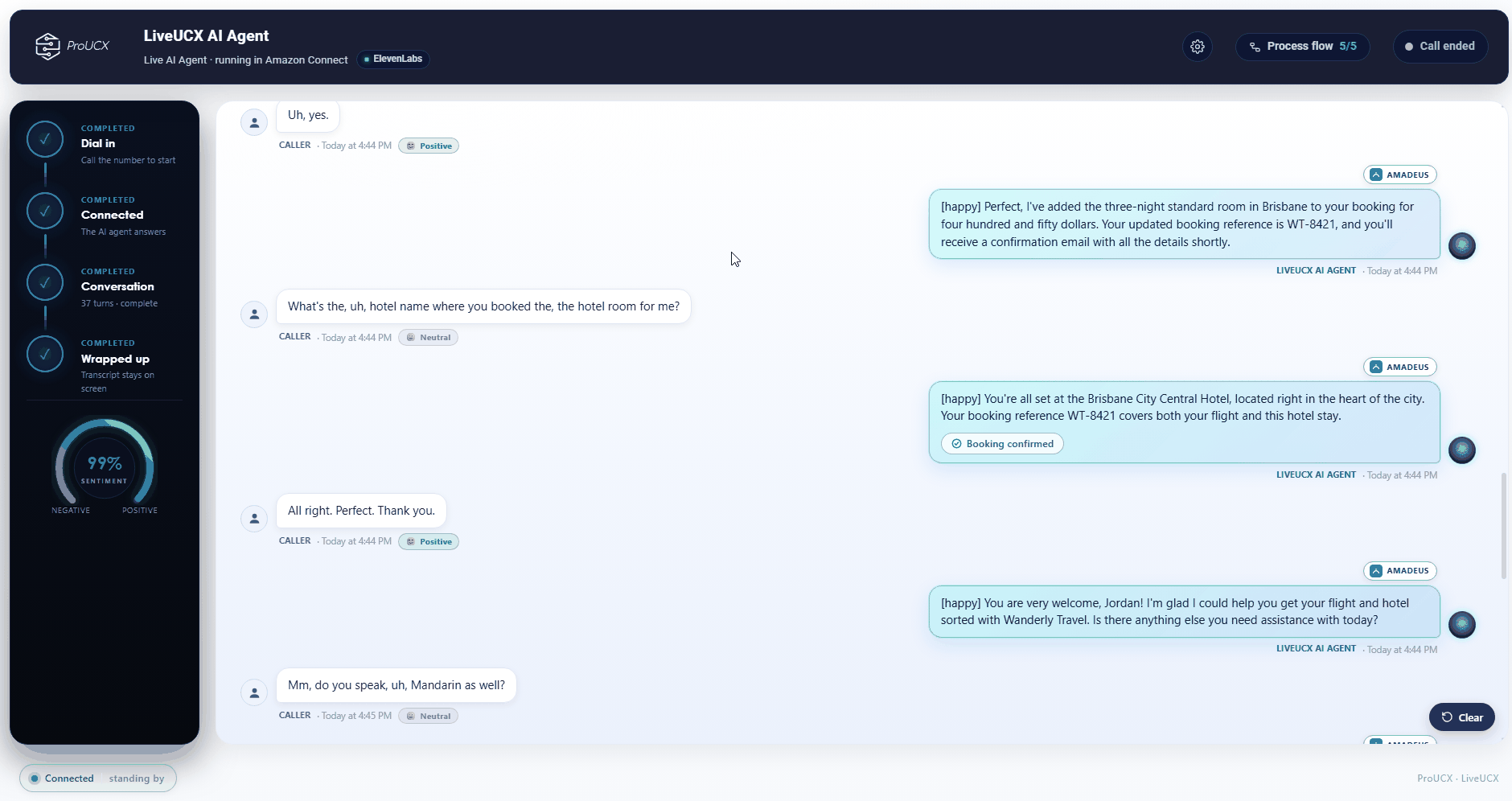
Integrations shown are examples. We configure the AI against your own systems during onboarding.

Full two-way speech on your own Amazon Connect number, with natural turn-taking — the caller can interrupt and be understood, not talked over by a script.

Every turn appears on screen as it is spoken and is scored for sentiment, so you can see how the conversation is actually going while it happens.

Reservation, CRM and core systems are called mid-conversation, with each step of the process flow ticked off as it completes.
From a ringing number to a completed process
A voicebot classifies the call. This one completes it. Most conversational AI in the contact centre is a smarter menu: it recognises a phrase, routes on it, and hands the caller to a queue with nothing to show for it. Live AI Agent is built to do the work.

The contact routes to the AI agent on your own Amazon Connect instance, exactly as it would to a person. It greets the caller and starts a natural conversation — no press-1 menu.

Full two-way speech with natural interruption. Every turn is transcribed live and scored for sentiment, so the conversation is visible while it happens rather than after the fact.

Mid-conversation the AI queries and updates your reservation, CRM and core platforms — looking up the booking, checking availability, applying the change.

Each step of the defined process is ticked off as it completes, so an outcome is a verifiable checklist rather than a claim.

The AI confirms the outcome to the caller. Where a person is needed, it transfers to a human queue and writes the summary, intent and transcript link to the contact attributes your CRM connector already reads.

If the AI can't help, the caller goes straight to a person. Ask for an agent, stay silent, or hit a limit and the call is transferred — the AI is an optimisation, never a trap.
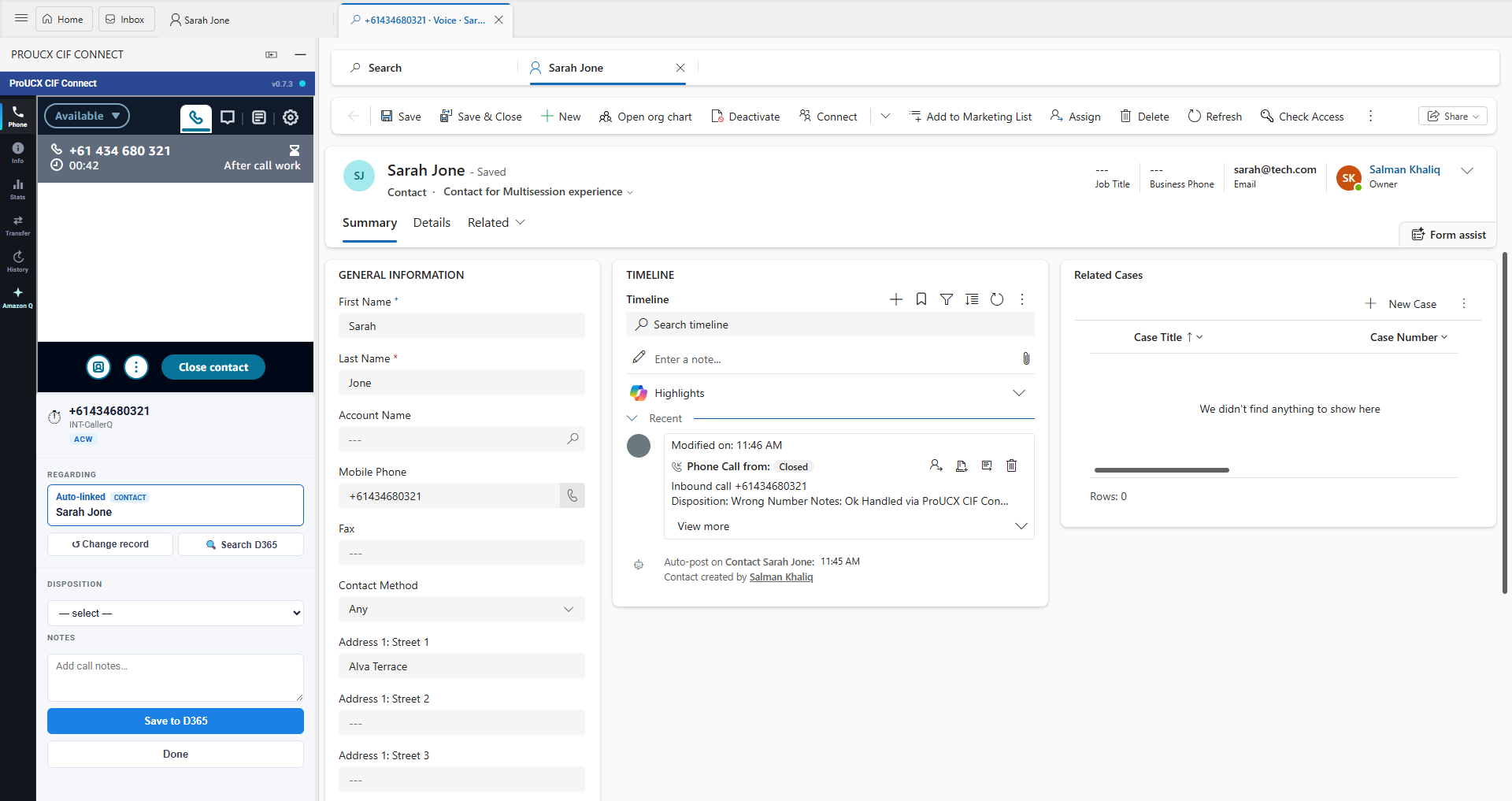
The AI summary, intent and transcript link surface in the agent panel when the call screen-pops the matching record. AWS Connect for Dynamics 365
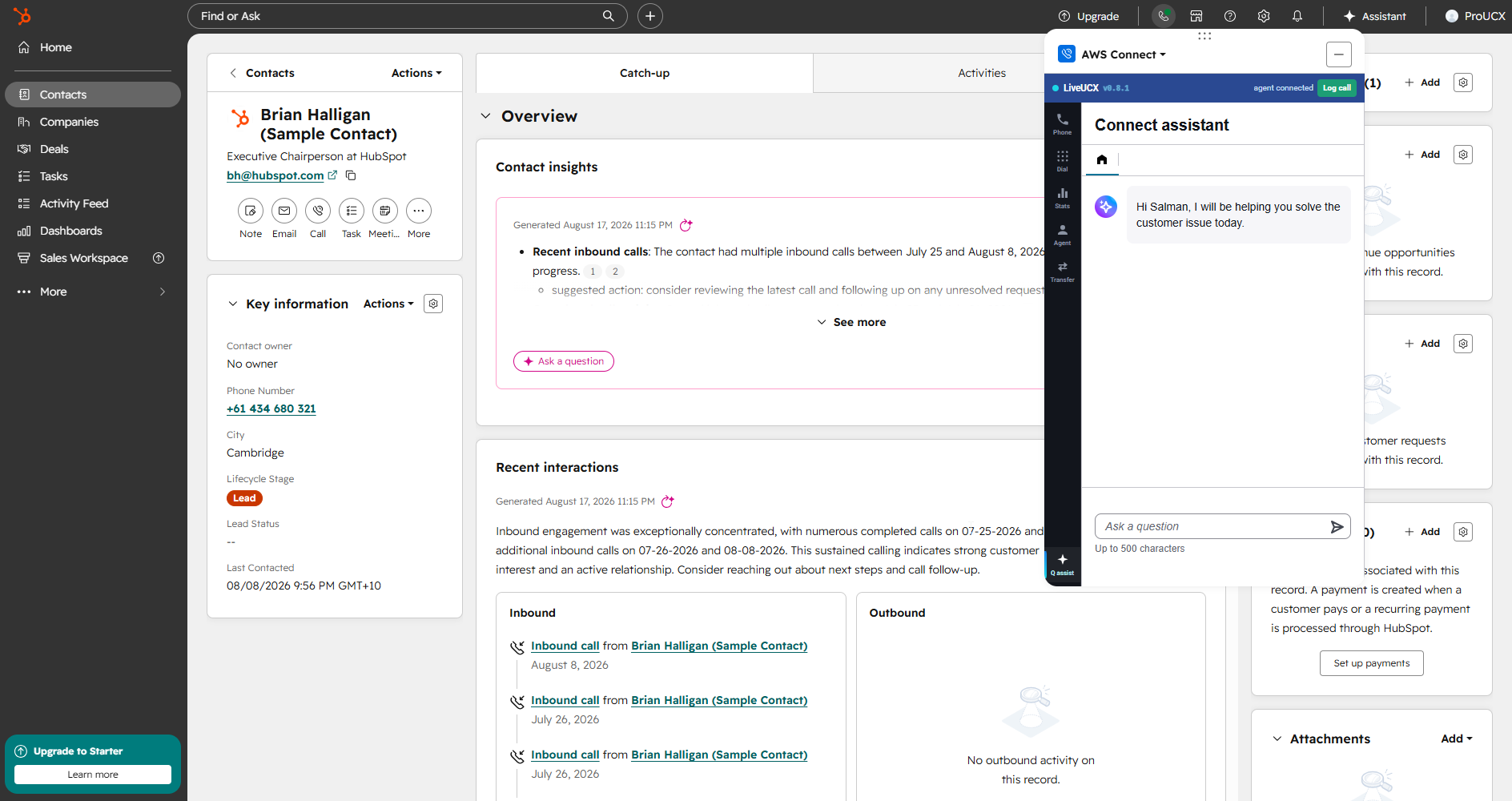
Context lands beside the matching HubSpot record as the call connects, so the rep opens the conversation informed. AWS Connect for HubSpot
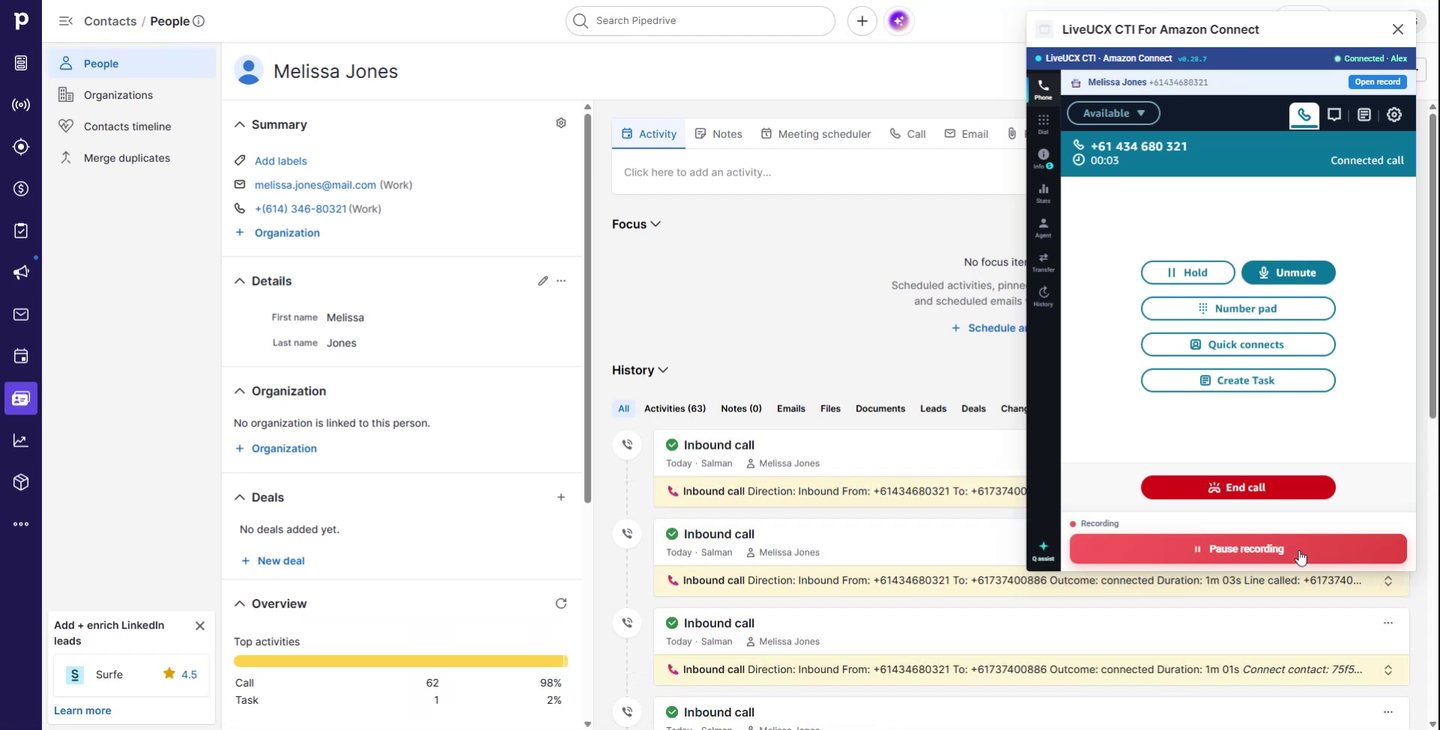
The summary and transcript appear against the matching person or deal the moment the softphone screen-pops. AWS Connect for Pipedrive
What Live AI Agent does
This is the part most Amazon Connect voicebots miss. Live AI Agent passes the conversation on through Amazon Connect contact attributes — the same mechanism the ProUCX CRM connectors already read for screen-pop. So the AI's work shows up right where your agent is already looking.
The AI operates as an agent inside your own Amazon Connect instance and is routed contacts like any member of the team.
Full-duplex speech with natural turn-taking — the caller can interrupt and be understood, rather than talked over by a script.
Turn-by-turn transcript on screen as the conversation happens, not a recording you review tomorrow.
Each message is scored so you can see how the caller is feeling as the call progresses, and where it turned.
Reservation, CRM and core systems queried and updated mid-conversation — the AI acts, it doesn't just classify.
The steps of your process are ticked off as they complete, so an outcome is auditable rather than asserted.
Transfers to a human queue with the AI summary, intent and transcript attached to the same Connect contact.
Because it works as a real Connect agent, call recording, Contact Lens analytics, transfers and Connect reporting apply to it too.
Move the AI in and out of queues on demand — extra capacity through a volume spike, scaled back after the peak.
ElevenLabs for voice quality, or an Australian speech endpoint where onshore processing is a requirement.
Ask for an agent, stay silent, or hit a limit and the call goes straight to a human — the AI is an optimisation, never a trap.
Surfaces context in the ProUCX connectors for Dynamics 365, HubSpot and Pipedrive with no connector changes.
Where it sits in your Amazon Connect contact flow
Nothing changes in front of the call. The caller rings the number you already publish, on the Amazon Connect instance in your own AWS account, and your existing contact flow decides what happens next. Live AI Agent is designed to be a routing decision inside that flow — which is why switching it on, or off, is a change you can make and reverse in an afternoon.
No porting, no new DID, no second telephony vendor in the path. The caller dials what they have always dialled and your carriage arrangements are untouched.
A queue, a set of hours, or a defined share of one queue. Most teams start after hours or on general enquiries, where the calls currently reach voicemail, and widen from there.
The contact is routed to the AI agent the same way it would be routed to a person on your team — it is offered the contact, it answers, and it starts talking.
When a person is needed the AI transfers to a human queue the way any agent would. There is no bridged second call leg and no external conference for your reporting to lose track of.
Because it stays one routed Connect contact with one contact ID, your recording configuration, Contact Lens analytics, real-time metrics and historical reports keep working as they do today.
Ask for a human, stay silent, or hit a limit and the contact is transferred to your queue. The escape hatch is part of the design, not something bolted on after the first complaint.
“Completes the job” — what that actually means
Understanding the caller is the easy half. The half that decides whether the project was worth doing is whether anything changed in your systems by the time the caller hung up — and whether the next person to touch the contact can see what happened.
Reservation, CRM and core platforms are queried and updated while the caller is still on the line — look up the booking, check availability, apply the change — against the integrations configured for you during onboarding.
Live AI Agent is built on the principle that wording may be generated but facts and actions come only from a system call. A model asked a factual question it has no tool for should not be free to invent an answer.
Each step of the process you define is ticked off as it completes, so “the booking was moved” is something you can point at rather than something the transcript implies.
A short plain-language summary of the conversation, the intent the AI settled on, and a link to the full transcript — written to Amazon Connect contact attributes on the same contact.
Contact attributes are the same mechanism the ProUCX connectors for Dynamics 365, HubSpot and Pipedrive use for screen-pop — so the context arrives with no connector change.
The agent who picks up opens on the summary instead of “can you start again for me?”. That shortening of the human leg is a real line in the business case, as what an AI voice agent actually costs sets out.
Do you need this, or do you need a better Lex bot?
Amazon Lex is the native answer to making the phone system understand people, it is inexpensive, and it is deeply wired into Amazon Connect. It is also an intent-and-slot engine, which is a specific kind of thing with specific failure modes. The honest question is not which is better — it is what shape your call mix is.
Routing on three or four choices, identification and lookup, and high-volume narrow tasks. It is the cheapest capable option per interaction, it stays in your own AWS account and region, and its behaviour is predictable enough to write test cases for.
Intent proliferation until you are managing a confusion matrix; compound requests in one breath; a caller changing their mind mid-slot; the long tail nobody thought to define; and order references and Australian place names.
You stop enumerating intents and start granting tools and boundaries. Compound and corrected requests resolve. Interruption is natural. And the output handed on is a plain-language summary rather than an intent name.
Generation is non-deterministic, so testing is statistical rather than pass/fail; cost per turn is higher and latency budgets are tighter. That is exactly why facts come from tool calls, confirmations stay deterministic, and full transcripts are logged for review.
Lex in front for identification and your two or three highest-volume deterministic tasks; anything that falls to the fallback intent goes to the conversational agent instead of straight to a queue. Or split by queue, by hours, or by percentage.
Three figures decide it: the share of contacts fully resolved, the share transferred, and the one everyone omits — repeat contacts from the same customer within seven days. High containment with a high repeat rate is deflection in a good suit.
Which voice answers, and where the audio is processed
Amazon Connect speaks with Amazon Polly out of the box. Live AI Agent is designed to be voice-vendor-flexible, because the right choice is a trade between how the agent sounds, what a minute costs, and which country the audio is processed in. We would rather set that out here than have you find it in a security review.
Native to Amazon Connect, billed by AWS on the account you already have, broad language coverage, and synthesis that stays in your AWS region. The predictable option, and often the right one.
Chosen where the voice itself is the point — the difference callers notice in the first three seconds. See ElevenLabs Voice Agent in Amazon Connect for that option in detail.
Where residency is contractual rather than preferred, an alternative provider offers an Australian speech endpoint — the same approach that lets Live Interpreter keep its speech path in-country.
We will not pretend otherwise. Choose the ElevenLabs voice and that audio is processed offshore, with Singapore the closest region to Australia. If that is a problem, say so before you commit and we will configure the onshore path instead.
Whichever voice you pick, the Amazon Connect instance, the call recordings, the contact records and your reporting stay in your own AWS account and region, exactly as they are today.
The voice provider is chosen during onboarding and can be revisited. More on how we handle your data in security, and on the voice comparison in Polly vs ElevenLabs over on Insights.
What it costs — the licence, and the three lines that are not
Live AI Agent is sold in session bundles through AWS Marketplace, so it lands on the AWS bill you already reconcile — no new vendor to onboard and no new payment instrument. Check the listing for current bundle sizes and terms.
The starting point for a proof of value on your own Amazon Connect instance and your own systems.
The usual shape of a pilot: enough to cover a real use case, an after-hours window and the tuning in between.
For teams taking the AI beyond one queue. Prices are in USD, so build an FX assumption into a twelve-month business case.
Amazon Connect service and telephony, speech, and the language model — all billed per minute or per turn, all yours. An AI-handled call costs the same telephony as a human-handled one of the same length; the saving is agent time.
Three of the four lines are per-minute, so an agent that resolves in ninety seconds is not marginally cheaper than one that meanders for five — it is roughly three times cheaper on everything except the licence.
Speech and model providers sell concurrency, not monthly volume. Ten thousand calls spread across a month is a small problem; the same ten thousand on the first Monday after a billing run is a different tier.
Live AI Agent questions
Live AI Agent for Amazon Connect is listed on AWS Marketplace, so you can subscribe against the AWS account you already have. You can also book a briefing and we'll run it against your own Amazon Connect instance. Building the business case first? What an Amazon Connect AI voice agent actually costs breaks the four cost lines down.
A voicebot recognises a phrase and routes on it. Live AI Agent holds a real full-duplex conversation — the caller can interrupt, change their mind and speak naturally — and it acts on what it hears, calling your booking, CRM and core systems to complete the process rather than just classifying the call. Every turn is transcribed live and scored for sentiment, and each step of the process flow is ticked off so you can see the work actually got done.
Yes. The AI operates as an agent inside your own Amazon Connect instance, so the call is a routed Connect contact end to end — and native Connect capabilities such as call recording, Contact Lens analytics and transfers apply. The AI also appears in your real-time and historical Connect reporting like any other agent.
An AI summary, the detected intent and a transcript link, written to Amazon Connect contact attributes. Our connectors for Dynamics 365, HubSpot and Pipedrive already read contact attributes for screen-pop, so that context lands in the CRM as the call connects.
Yes — that drives the choice of voice provider. The ElevenLabs path is chosen for voice quality and is processed offshore; an alternative provider offers an Australian speech endpoint for buyers with onshore residency requirements. Tell us your constraints and we'll confirm the right configuration during onboarding.
Yes. Open the live demo and watch a call run end to end — the lifecycle, the live transcript with sentiment, the back-end integrations and the process flow completing.
As a routing decision, not a re-platform. The caller rings the number you already publish, your existing flow runs, and you decide which contacts are offered to the AI — a queue, a set of hours, or a share of one queue. Your number, carriage and Amazon Connect instance are unchanged.
No, and we would advise against it. Most teams start where the risk is lowest — after hours, or the general enquiry number where the long tail lives — then widen once they can see containment and repeat-contact figures they trust.
No. Lex is an intent-and-slot engine and it is excellent where the call reasons genuinely are a short list. A conversational agent earns its place on the long tail, on compound requests and where intent maintenance has become somebody's job. Running both — Lex in front, the AI catching the fallback — is usually the right answer. Amazon Lex vs an AI voice agent sets the comparison out in full.
A short plain-language summary of what the caller wanted and what was done, the intent the AI settled on, and a link to the full transcript — on the same Amazon Connect contact, so the human leg and the AI leg reconcile against one contact ID.
The licence is sold in session bundles on AWS Marketplace — US$300 for one, US$1,000 for five and US$3,000 for twenty; check the listing for current terms. Three further lines are yours and billed by usage: Amazon Connect service and telephony, speech, and the language model. What an Amazon Connect AI voice agent actually costs has the full model.
Yes. Polly is native to Amazon Connect, billed on the AWS account you already have and synthesised in your own region, which makes it the predictable choice. ElevenLabs is chosen where the voice itself is the point. The trade-offs are compared in Polly vs ElevenLabs on Insights.
It transfers to a human queue as any agent would, and the summary, intent and transcript link go with it. Asking for a person, going silent or hitting a limit all take the caller to the same place — the AI is designed as an optimisation, never a trap.
Your own Amazon Connect instance, one use case worth automating, and someone who can authorise access to the back-end system the AI needs to call. Bring your Contact Lens data too — your existing transcripts are the fastest way to see whether your call mix is concentrated or scattered.
Put an AI agent on your Amazon Connect number
Subscribe on AWS Marketplace and bill it to the AWS account you already have, or book a briefing and we'll run it against your own Amazon Connect instance and your own systems.
Available on AWS MarketplaceLive AI Agent for Amazon Connect — by LiveUCX
Want the ElevenLabs voice specifically? See ElevenLabs Voice Agent in Amazon Connect · Need the same platform translating a live call? See Live Interpreter